

What it is
Schedules allow you to run automated, recurring tasks in the background of your web application. There are two main ways to use them: App-owned schedules are defined by you, the website creator, and are perfect for global app-wide logic. User-owned schedules are created by the end-users of your application. This allows you to build apps where your users can define their own automations. For example:- A newsletter app where each user chooses their topic, email address, delivery cadence, and time of day
- A habit tracker where users schedule their own personalized reminders
How to use it
Setting up schedules is done conversationally. You simply tell Manus what automated tasks you want your app to perform. Manus will write the logic into your website code and register the cron job automatically.Adding an app-owned schedule
Describe the recurring task you want to automate directly in the Manus chat. For example:“Set up a schedule to fetch the latest stock prices from the API every 15 minutes and update the dashboard.”Manus will write the necessary backend logic and register the schedule to run at your specified interval.
Adding user-owned schedules
To let your app’s users create their own schedules, ask Manus to build the feature into your app:“Create a feature where my users can schedule a daily email reminder for their tasks, letting them pick the time of day.”Manus will build the UI for your users and handle the underlying schedule creation dynamically.
Managing your schedules
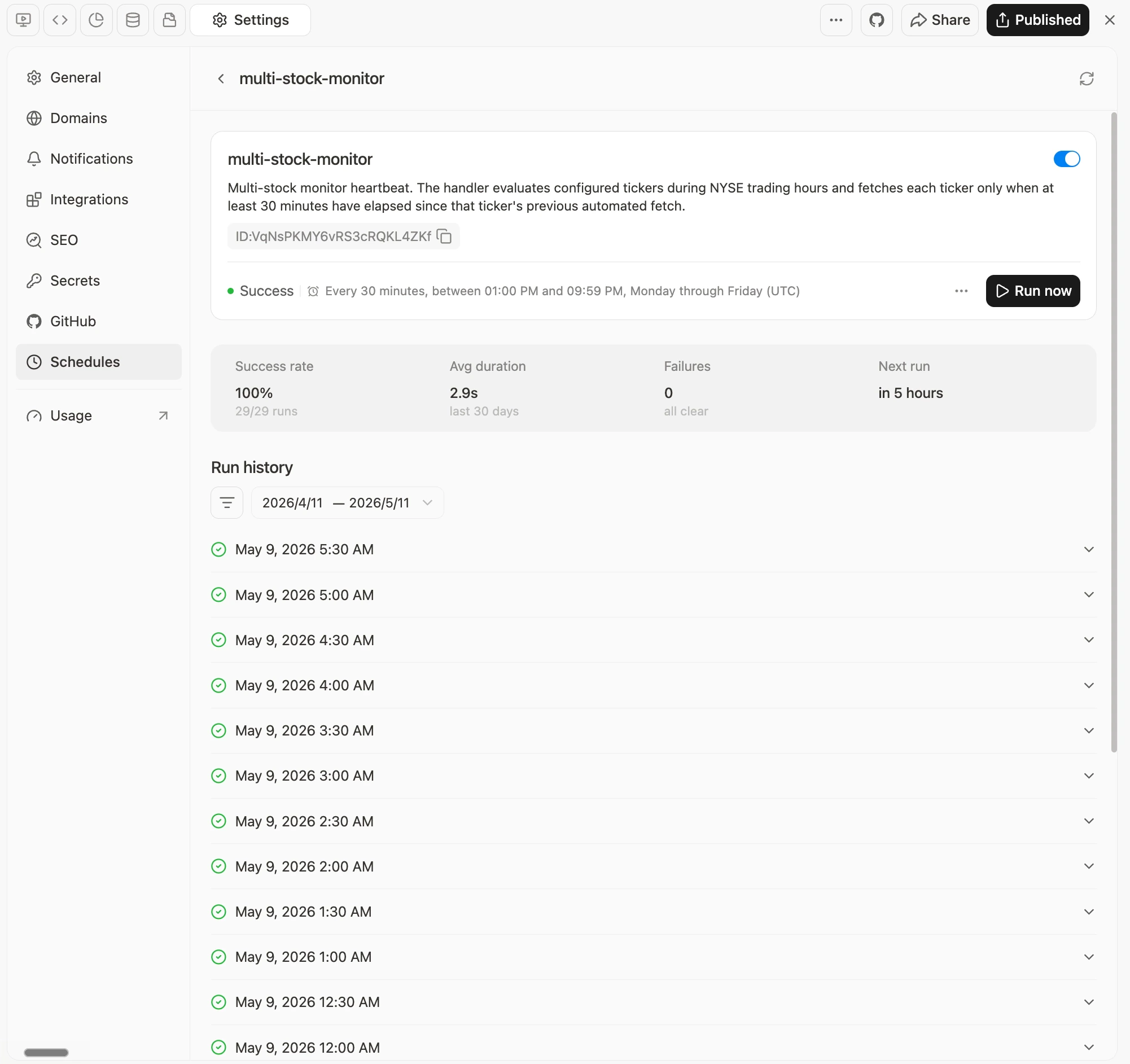
You can view, pause, or delete your schedules at any time from Settings > Schedules in your Manus project dashboard. The dashboard shows each schedule’s status, next run time, success rate, average duration, and full run history.Limitations & Configurations
Timezones: All schedules run in UTC. When you ask Manus to create a schedule for a specific local time (e.g., “every day at 9 AM Tokyo time”), Manus will automatically handle the conversion to UTC for you.
Failures and retries: If a scheduled job fails, the scheduler will automatically retry it up to 3 total attempts with exponential backoff. You can view the detailed response payload and error logs in the Run History section of the dashboard. Click Investigate to have Manus automatically analyze and fix the error.
What is the difference between app-owned and user-owned Schedules?
What is the difference between app-owned and user-owned Schedules?
App-owned Schedules are created by the app builder for global app behavior. User-owned Schedules are created by users inside the app for personal reminders, newsletters, alerts, or reports.
Do I need to configure the background setup myself?
Do I need to configure the background setup myself?
No. You describe the scheduled behavior you want, and Manus handles the setup for the task or web app.
Where can I manage web app Schedules?
Where can I manage web app Schedules?
You can manage them from Settings > Schedules in the Manus project dashboard, where you can review status, next run time, success rate, average duration, and run history.