

What it is
Data cache lets your web app remember the results of slow work and reuse them for every visitor. Your app’s server does the slow work once, saves the answer, and serves the saved answer to everyone who asks next. Slow work can be a call to an outside API, a fetch from Google Sheets or Notion, or a heavy database query. Without a data cache, your server repeats that work for every visitor. With a data cache, most visitors get the saved answer right away. The data cache is a managed Redis instance that runs next to your app’s server. You do not need a separate account, keys, or setup. Manus turns it on and writes the code that uses it.A data cache is not for every app. It pays off when many visitors ask for the same slow data. If your site has light traffic, or your pages are already fast, you probably do not need one. Not sure? Ask Manus to check your project first.
When a data cache helps
Live data without hitting the API limit
Your site shows live prices, weather, or sports scores from an outside API. Each visitor triggers a new API call, so pages slow down as traffic grows. Most APIs also limit calls per minute and can block your site. With a data cache, your server calls the API at most once a minute and serves every visitor from the cache. The API sees about one call per minute, no matter how many visitors arrive.“My homepage shows live prices from [API]. Use the built-in Manus data cache to fetch them at most once a minute and serve every visitor from the cache.”
Fast pages when your content lives in Google Sheets or Notion
You keep a menu, a product list, an event schedule, or blog posts in a spreadsheet or a Notion database. Each page view calls that service, which adds a wait and can hit its limits. With a data cache, your server fetches the content every few minutes and serves visitors the saved copy. Your edits still appear on the site within a few minutes.“My site loads its menu from Google Sheets. Use the built-in Manus data cache to fetch it at most once every 5 minutes and serve every visitor from the cache.”
Leaderboards and “trending now” lists that stay fast
Your community, quiz, or game shows a top-100 leaderboard, a “most popular this week” list, or site-wide stats. Building that list takes a heavy database query, and the query gets slower as your data grows. With a data cache, your server builds the list once a minute and serves the saved copy. The scores stay safe in your database.“My leaderboard page is getting slow. Use the built-in Manus data cache to build the top 100 once a minute and serve the saved list.”
Other ways apps use a data cache
- Dashboard totals. Compute “today’s sales” once a minute instead of on every page view.
- Short-window limits. Allow at most 20 login attempts per minute from one IP address.
- Codes that expire. Store email verification codes that stop working after 10 minutes.
- Sessions for custom sign-in. Keep users signed in when your app has its own sign-in system. The default Manus login does not need this.
When you probably do not need one
- Your site has light traffic. If few visitors arrive, there is little repeated work to save.
- Your site has no server code. Static sites, landing pages, and portfolios cannot use a data cache. Manus hosting already caches their files.
- Your pages are already fast. Small database queries do not need a cache.
- The data must never be lost. Orders, accounts, payments, and user content belong in your database.
How to use it
Ask Manus whether your app will benefit
1
Open the Data cache settings
Open your web project and go to Settings → Hosting. Find the Data cache section. Before you add a data cache, it reads Add a data cache.
2
Ask Manus
Select Ask Manus. Manus drafts a prompt in the chat. Send the prompt. Manus reviews your project and tells you which pages would get faster, what it would cost, and what the trade-offs are.
3
Approve the data cache
If you agree, Manus turns on the data cache and writes the code that uses it.
4
Test and publish
Test your app in Preview, then publish it. For details, read Publishing.
Manage your data cache
After you add a data cache, the Data cache section shows its status and the storage it uses.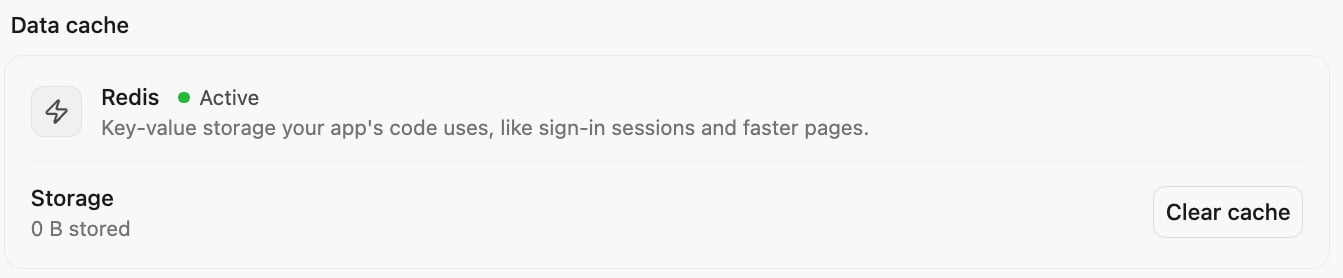
- To clear all cached data: Select Clear cache and confirm. This clears the data for both Preview and the published site. You need database write permission.
- To turn off the data cache: Ask Manus to turn it off. Manus first removes the code that depends on it, then deletes the data cache and its data.
What you need to know
- It is off by default. You add a data cache per project, and it only speeds up the parts of your app that use it.
- It is for web apps with a server. It is not available for Game or Mobile projects. If your web project has no server yet, Manus adds one. For details, read Cloud infrastructure.
- It is not a page cache. It does not cache your HTML pages, images, or scripts in the browser. It speeds up the work your server does.
- Preview and the published site share one data cache. Data written while you test in Preview is visible on your live site.
- Publishing does not clear the data cache. Ask Manus to set an expiry time on cached data so that it refreshes by itself.
- Your data is deleted if your Cloud balance runs out. After you top up, your app starts with an empty data cache.
- Copies of a project start empty. A copy of a project gets its own new data cache, billed separately. For details, read Make a copy.
- It is billed from your Cloud balance, not Agent credits. Charges use your free Cloud allowance first, then your paid Cloud balance. For details, read Usage and pricing.
Tips
- Tell Manus about your traffic. Mention how many visitors you expect and which pages feel slow. Manus can then judge whether a data cache is worth it.
- Name the feature in your prompt. Write “the built-in Manus data cache.” In older chat sessions, Manus may otherwise suggest an outside Redis provider.
- Set an expiry time. One minute suits live data. A few minutes suits content from a spreadsheet.
- Do not poll too often. Every command is billed. A check every second costs about $8.53 per month for no real benefit.
FAQ
How do I know if my app needs a data cache?
How do I know if my app needs a data cache?
Ask Manus. Select Ask Manus in Settings → Hosting → Data cache, and Manus reviews your project. As a rule, a data cache helps when many visitors load the same slow data.
Will a data cache make my site faster?
Will a data cache make my site faster?
It speeds up repeated requests that your server handles, such as outside API calls and heavy queries. It does not change how static files or pages reach the browser.
How much does it cost?
How much does it cost?
The cost depends on how many commands your app sends. These estimates use list prices and are not measured values:
How do I stop paying for it?
How do I stop paying for it?
Ask Manus to turn off the data cache. If you turn it off before the UTC month ends, you do not pay that month’s $0.75 fee.
Why does my live site show old data after I publish?
Why does my live site show old data after I publish?
Publishing does not clear the data cache. Ask Manus to set an expiry time on cached data, or select Clear cache.
Why were my users signed out after I cleared the data cache?
Why were my users signed out after I cleared the data cache?
Your app may store its sign-in sessions in the data cache. Clearing deletes those sessions. The default Manus login does not use the data cache, so clearing does not affect it.
Manus suggested an outside Redis provider. What should I do?
Manus suggested an outside Redis provider. What should I do?
Select Ask Manus in Settings → Hosting → Data cache, or write “the built-in Manus data cache” in your prompt.