Manus vs Synthesia: Which Video Generator Is Right For You?
AI video generation has come a long way. What used to be a novelty is now a serious tool for marketers, content creators, and businesses looking to produce video at scale without the overhead of traditional production. But with so many AI video generators on the market, the real question isn't whether you should use one. It's which one fits your needs.
Two platforms that keep coming up in this conversation are Manus and Synthesia. On the surface, they both generate videos using AI, but they couldn't be more different in how they approach it. Synthesia is a dedicated AI avatar video platform built for corporate communications and training. Manus is a general-purpose autonomous AI agent that can generate creative videos, build websites, conduct research, and automate entire workflows. To find out which one actually delivers, I put both to the test with two very different challenges: a wildly creative cinematic scene and a polished corporate announcement. Here's what happened.
Manus vs. Synthesia: At a Glance
Before diving into the details, here's a quick comparison for those who want the short version.
Feature | Manus | Synthesia |
Best For | Creative video generation & automated workflows | Professional training & corporate videos |
Core Technology | Autonomous AI Agent | AI Avatar & Voice Generation |
Primary Use Case | Cinematic shorts, social media, task automation | Corporate communications, L&D, sales enablement |
Ease of Use | Simple prompt interface, but video gen is a paid feature | Intuitive for avatar videos, less so for AI Playground |
AI Video Models | Generates via integrated AI models | Sora 2, Veo 3.1, Veo 3.1 Fast (via AI Playground) |
Customization | High (creative freedom, multi-step workflows) | High (avatars, templates, branding kits) |
Starting Price | $20/month (Standard) | $29/month (Starter) |
Free Plan | Yes (limited credits, no video gen) | Yes (10 min/month, limited avatars) |
How I Tested Manus and Synthesia: Two Real-World Scenarios
To keep things fair and transparent, I used the exact same two prompts on both platforms. One was designed to push creative limits, and the other was a realistic business use case. Here's the breakdown.
Scenario 1: The Creative Challenge
I wanted to see how each platform handles an imaginative, cinematic concept. The prompt: "A sloth wearing a helmet and sunglasses riding a vintage motorbike through the bustling streets of Bangkok at night, with neon signs reflecting on the wet road. Cinematic, wide-angle shot, 4K." This tests the AI's ability to interpret a surreal concept, handle complex lighting, and produce natural-looking motion.
Scenario 2: The Professional Task
For the business test, I went with something more grounded: "Create a 30-second, upbeat animated graphics video for our company's community work initiative. The video should show animated characters volunteering at a pet shelter, planting trees, and cleaning up a beach. Use a bright, friendly color palette and inspiring background music. End with the call to action: 'Join Us in Making a Difference!' and 'Company XYZ' in a modern, bold font." This tests how well each tool can produce a polished, on-brand corporate video from a detailed brief.
For both tests, I evaluated prompt adherence, output quality, ease of use, and overall polish.
Synthesia: Best AI Video Generator for Professional Avatar Videos
Synthesia has built its reputation as the go-to AI avatar video generator for businesses. Used by over 50,000 teams, it's designed to help companies create professional training videos, corporate announcements, and sales enablement content without cameras, studios, or actors. With 160+ languages, 230+ AI avatars, and a library of templates, it's a polished platform for anyone in L&D or corporate communications.
My Experience with Synthesia
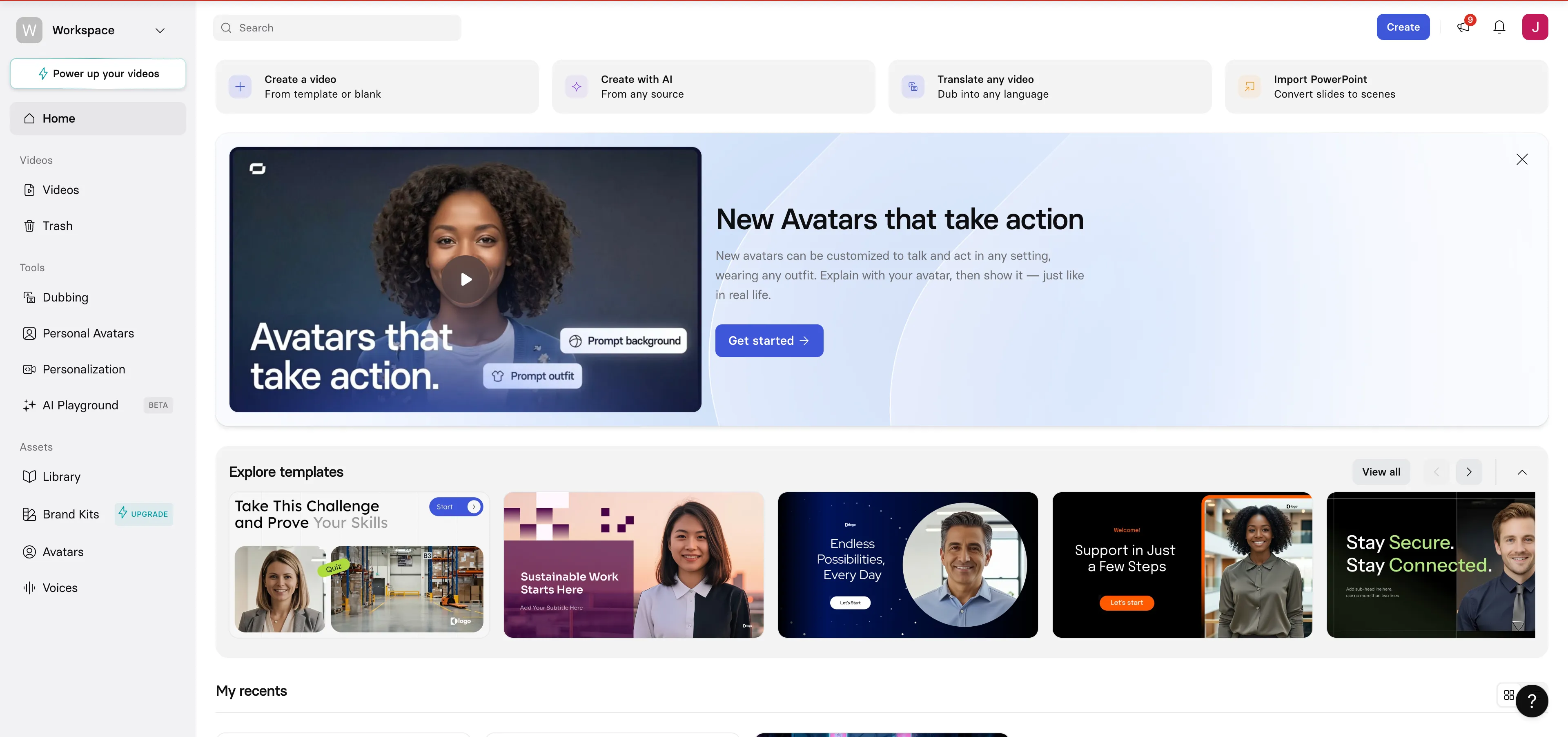
Getting started with Synthesia was a bit of a mixed bag. The dashboard is packed with features, and when I first clicked "create a video," it dropped me into a PowerPoint-style template editor, which wasn't what I was looking for at all. I'd actually used the platform before, but coming back to it, I had to re-learn where things were, which says something about the interface when it comes to AI video generation specifically.
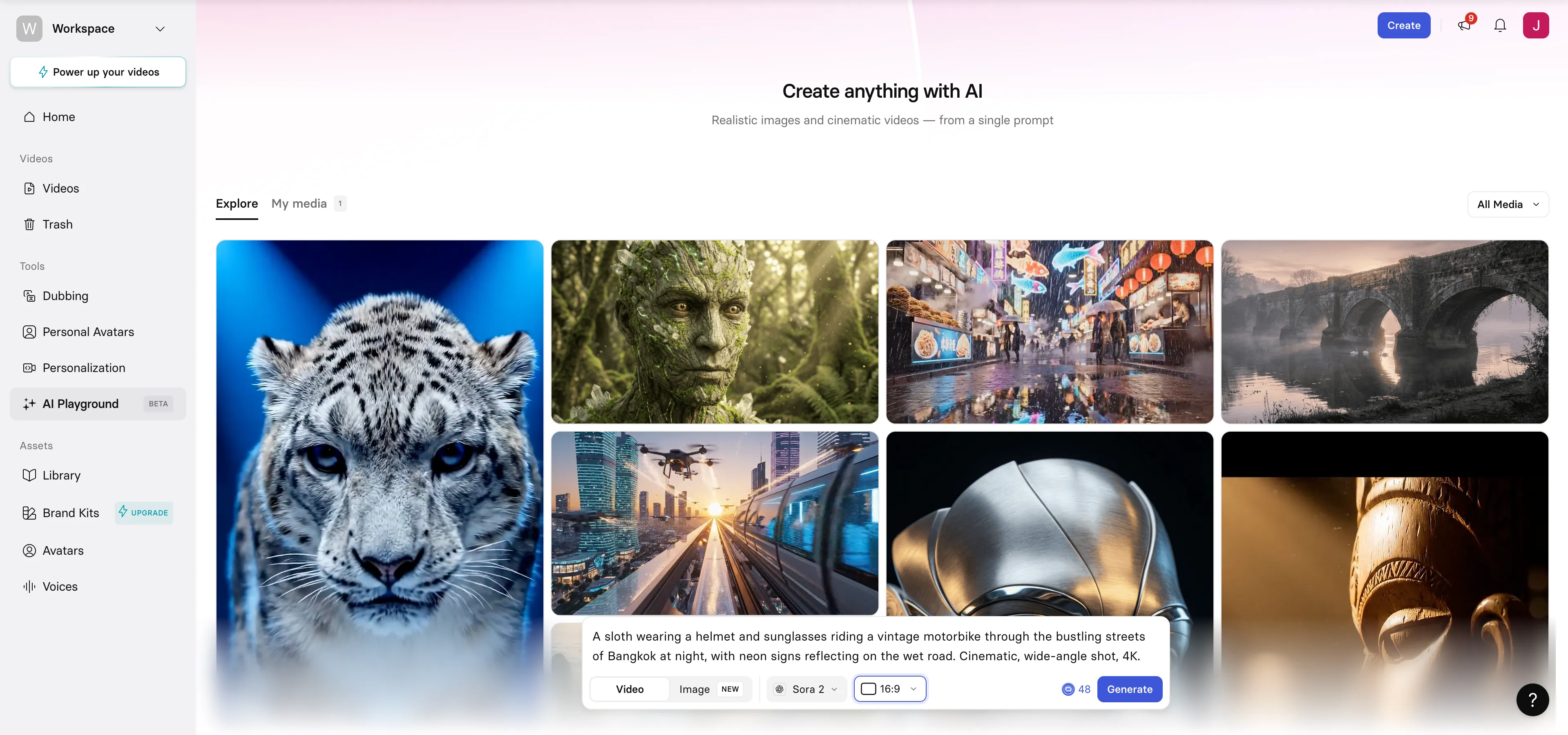
After some clicking around, I found the right button: AI Playground. This is where the text-to-video generation lives. The interface here was much more straightforward, with a library of sample videos for inspiration, a simple prompt box, and options to switch between video and image generation. I could also choose between different AI models, including Google's Veo 3.1, Veo 3.1 Fast, and Sora 2 (which was the default). The aspect ratio was adjustable, and the interface showed how many credits I had remaining. I was testing on the Starter plan ($29/month), since Synthesia's free tier is quite limited.
Test 1: The Creative Challenge (The Sloth on a Motorbike)
I knew going in that this wasn't Synthesia's sweet spot, but I was curious to see what it could do. I pasted in the creative prompt and let it run.
The output was actually a high-quality video with solid production value. The background music felt natural, almost cinematic, with a slight score playing alongside ambient sounds of vehicles and wheels on a wet road. The sloth was there, wearing the helmet and sunglasses, riding a vintage motorbike. Movement looked pretty natural overall, and the neon signs reflecting on the wet road were captured well.
Where it fell short was in the details. The street didn't feel like Bangkok at all. There were no Thai signs or iconic features that would place you in the city. The signboards on the stores looked more Chinese than Thai, and the characters were blurred and unclear. Synthesia attempted to include some tuk-tuks, but they came out deformed and hard to recognize. The prompt specifically called for "bustling" streets, but there were barely any people around, and the background noise was just the sound of a quiet road, not a busy night market. Still, the overall visual quality and motion were decent for a platform that isn't designed for this kind of creative work.
Test 2: The Professional Task (Community Work Initiative Video)
This is where I expected Synthesia to shine, and it mostly did, with a few hiccups along the way.
Getting the video to generate took a few attempts. The system failed twice on me before finally producing a result on the third try. Third time's the charm, I suppose. The prompt asked for a 30-second video, but what I got was only about 8 seconds long. It also started abruptly, already mid-sentence when I hit play, and the first scene cut away really fast. Each scene moved a bit too quickly to fully process what was happening, and I found myself pausing just to take in the visuals.
That said, the content itself was solid. The script covered everything I asked for: planting trees, volunteering at a shelter, cleaning up the beach. There was a call to action about making an impact at the end, exactly as requested. Visually, the animation was cute, inviting, and friendly. It had the right tone for a corporate community initiative video. The ending scene for the CTA was simple but effective, and it included everything I specified. If the video had been the full 30 seconds and started cleanly, it would have been a really strong output for this kind of use case.
Synthesia: Key Features, Pros & Cons
Key Features:
•230+ AI Avatars: Choose from a massive library of realistic avatars, or create custom ones on higher plans.
•160+ Languages & Voices: Generate videos in virtually any language with natural-sounding voiceovers.
•AI Playground: Access Sora 2 and Veo 3.1 for text-to-video generation beyond avatar-based content.
•Templates & Branding: Pre-built templates and brand kits for consistent corporate content.
What I Liked | What I Didn't Like |
Natural-looking motion and video quality | Dashboard navigation is confusing for video gen |
Great ambient sound design and music | Generation failed twice before working |
Neon reflections and wet road looked solid | Video was 8 seconds instead of 30 |
Animation style was perfect for corporate use | Street scene didn't feel like Bangkok at all |
Prompt content was mostly covered | Abrupt start and cut-off ending |
Who It's Best For: Synthesia is ideal for businesses and teams that need to produce professional avatar-led videos for training, corporate communications, and sales enablement. If your primary need is polished, consistent, on-brand video content at scale, Synthesia delivers.
Manus: Best AI Video Generator for Creative Freedom & Automated Workflows
Manus takes a completely different approach. Rather than being a dedicated video platform, it's an autonomous AI agent that can handle everything from deep research and data analysis to website building and, yes, video generation. This means it brings a unique set of capabilities to the table, including the ability to generate custom images using Nano Banana Pro and stitch them into animated video sequences. It's not just a video tool; it's an entire creative workflow in one interface.
My Experience with Manus
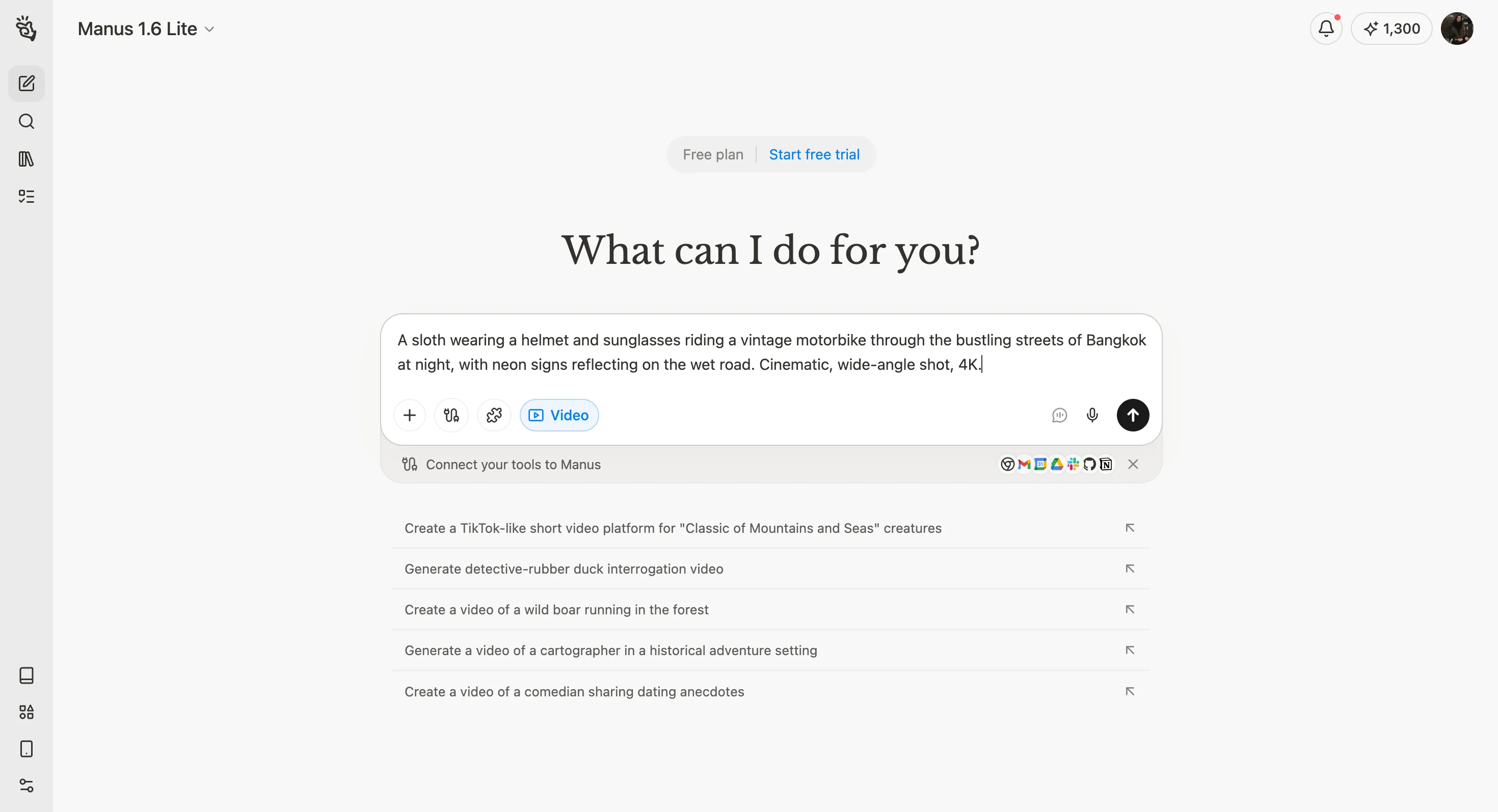
From the moment I logged in, the experience was straightforward. The interface is clean and minimal, with a prompt box front and center. There were prompt suggestions to get started, and I naturally clicked the one that said "video" since that's what I was testing. Unlike Synthesia, there's no library of past videos to browse, which makes sense given that Manus is a general AI agent, not a dedicated video platform.
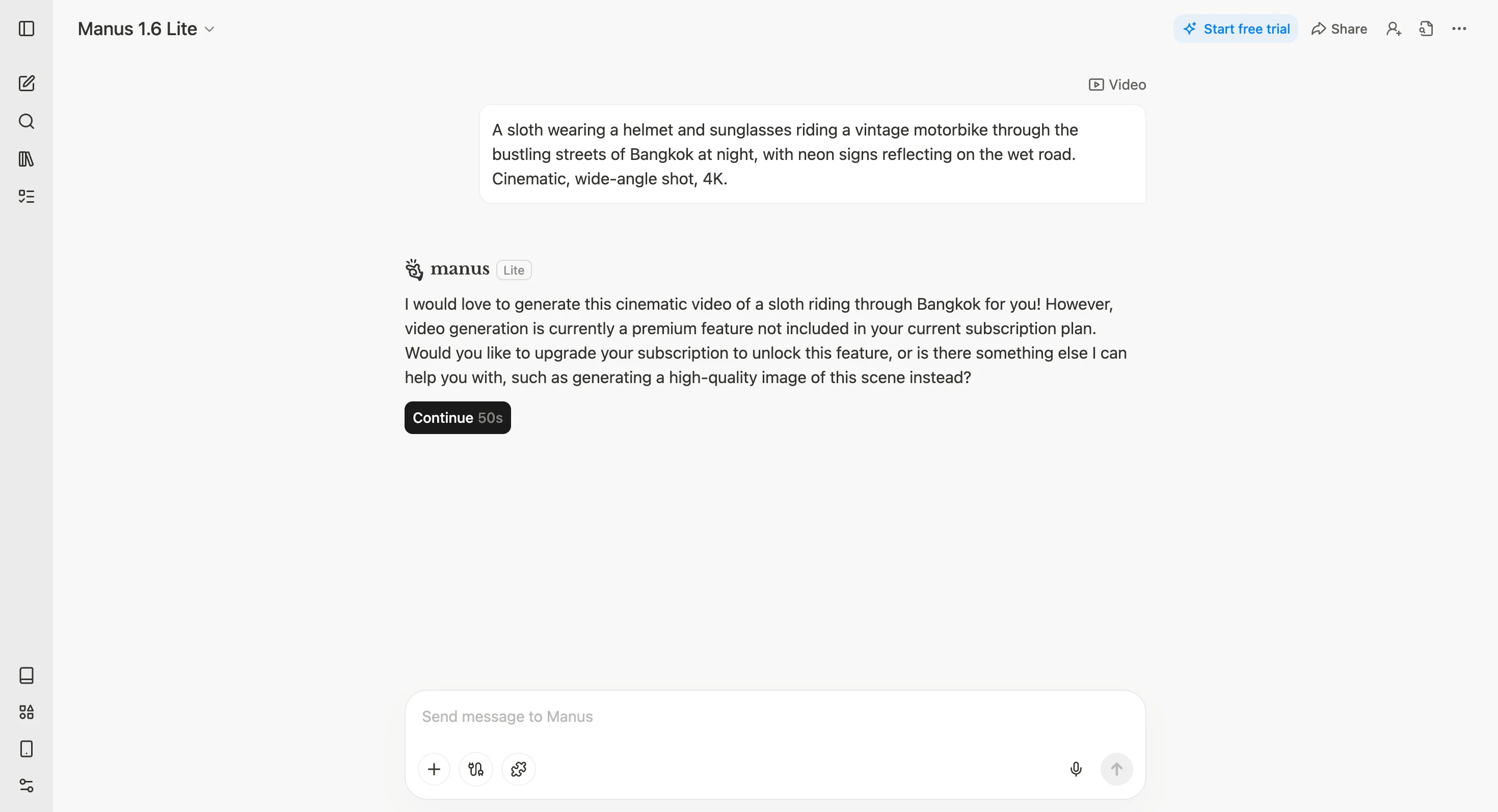
I started on the free version Manus 1.6 Lite, and when I entered my creative prompt, the AI politely told me that video generation is a premium feature not included in my current plan. It offered to create a high-quality image of the scene instead, which was a nice touch. For this test, though, I needed video, so I upgraded to the paid plan. The interface looked the same, but now I could toggle between Manus 1.6 and Manus 1.6 Max. I went with Max for the best possible output.
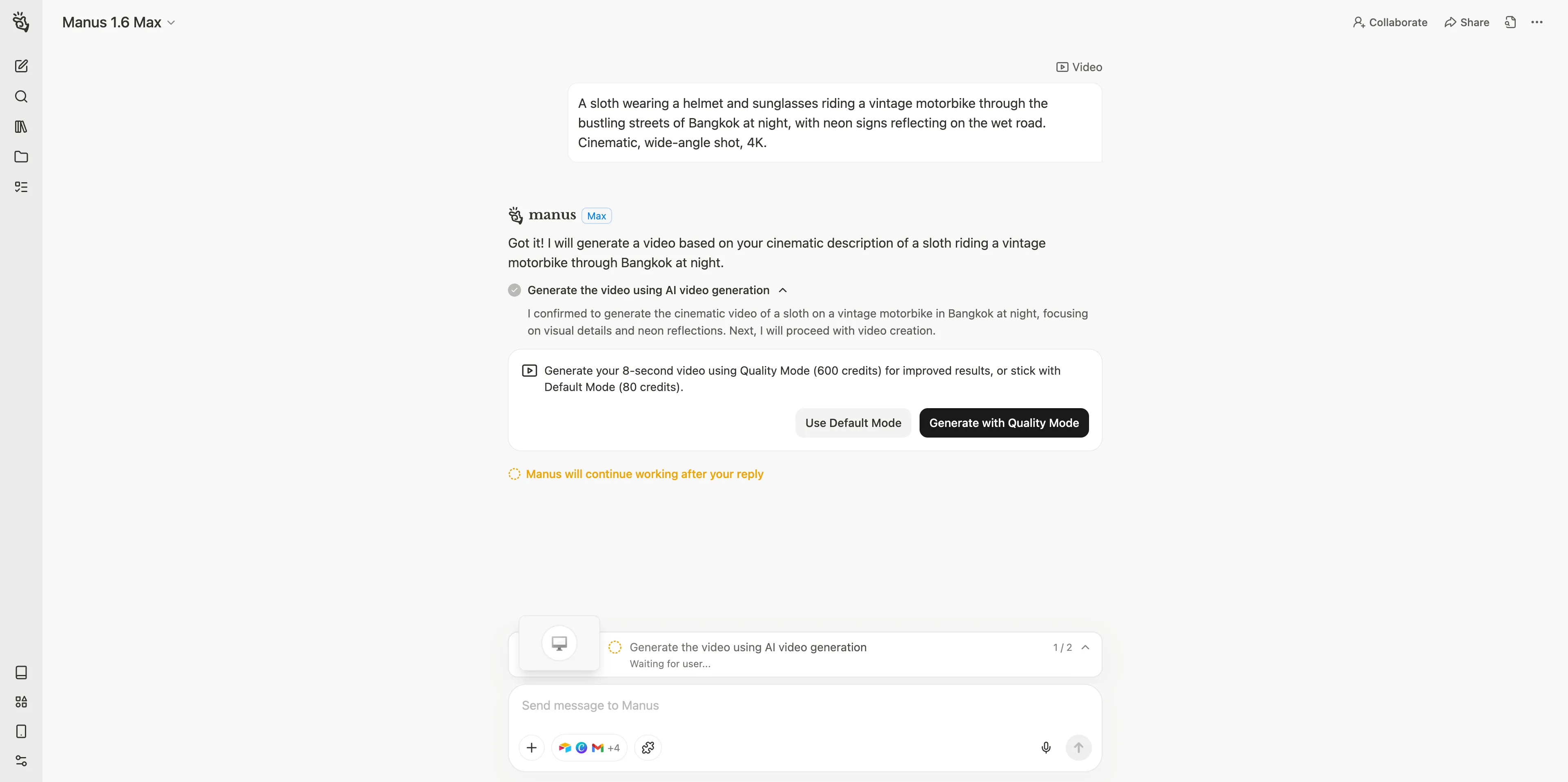
One thing that stood out was the quality mode prompt. Before generating, Manus asked if I wanted to use "quality mode," which uses more credits but produces improved results, versus the default mode that's lighter on credits but potentially lower quality. Since I was already on the paid plan, I went with quality mode.
Test 1: The Creative Challenge (The Sloth on a Motorbike)
Here's where things got interesting. I gave Manus the exact same creative prompt, and the result was visually striking but with some clear trade-offs.
The details were sharp. The sloth was front and center on a vintage motorcycle, wearing the helmet and sunglasses exactly as described. The scene was set on a bustling Thai street with clear signboards written in Thai, and there were multiple tuk-tuks visible in the frame. If we're comparing prompt adherence alone, Manus performed considerably better than Synthesia at capturing the specific details of the scene.
Where it fell short was the motion. The movement was extremely unnatural. The sloth and motorcycle weren't travelling naturally at all, and the wheels weren't even rolling. It looked like a still image had been superimposed onto a moving background, almost like a bad Photoshop job. While the sloth and bike were moving down the street, the background was mostly static. None of the other vehicles, storefronts, or street activity were moving in a natural way. The background audio was a mix of bustling street sounds and an upbeat EDM track, which could work depending on your taste, but it felt like an odd pairing for a cinematic Bangkok night scene.
Test 2: The Professional Task (Community Work Initiative Video)
For the corporate video, Manus took a different approach entirely. As the AI worked on the task, I could see it using Nano Banana Pro to generate a series of key images for each scene, and they all looked really good and matched the theme perfectly. I was genuinely excited to see the final video.
The output was a 30-second video (matching the prompt exactly) divided into three clear sections: volunteering at the pet shelter, planting trees in a garden, and picking up litter by the beach. There was calming background music throughout, with natural sounds layered in for each scene. The visuals from the Nano Banana Pro-generated images looked great as still frames.
But as the video played and animation was added, a number of glitches became apparent. In the pet shelter scene, animals and pets appeared and disappeared out of nowhere. Some of the pets had deformed limbs, and the main character in the foreground seemed to be pouring food from plates onto the ground and then tossing it at the dogs, which then vanished. The tree planting scene looked the best and most natural, though if you focused on the details, one of the volunteers appeared to be scooping soil from the ground and placing it on top of a plant, which isn't exactly how gardening works. The beach cleanup scene had a landscape that didn't quite make sense, with the shore flanked by ocean on two sides, and there were turtles and fish unusually close to the shoreline. One of the volunteers appeared to be picking up litter and throwing it into the ocean, which is the opposite of what you'd want in a community cleanup video.
The ending scene did include the call to action as requested, and it looked clean with solid animations. There was also a strange moment in the middle section where dialogue suddenly appeared from the characters, which felt out of place since the rest of the video had no speech at all. Overall, the still images were excellent, but the transition to animated video introduced quite a few artifacts.
Manus: Key Features, Pros & Cons
Key Features:
•Autonomous AI Agent: Goes beyond video to handle research, writing, coding, and complex multi-step workflows.
•Nano Banana Pro: Generates high-quality custom images that serve as the visual foundation for video content.
•Quality Mode: Option to use more credits for improved output quality.
•Multi-Model Support: Toggle between Manus 1.6 and Manus 1.6 Max for different performance levels.
What I Liked | What I Didn't Like |
Excellent prompt adherence and detail accuracy | Movement was extremely unnatural |
Thai signboards, tuk-tuks, and scene details were spot-on | Video looked like images superimposed on backgrounds |
Nano Banana Pro images were genuinely impressive | Visual glitches in animated sequences |
Delivered exactly 30 seconds as requested | Unexpected dialogue in the middle of the corporate video |
Quality mode option for better results | Background was mostly static in the creative test |
Who It's Best For: Manus is the right choice for creators and professionals who need more than just video generation. If you want a tool that can research your topic, generate custom visuals, and produce video content as part of a larger automated workflow, Manus offers a level of versatility that dedicated video platforms simply can't match.
Pricing Comparison: Manus vs. Synthesia
Pricing is always a key factor, and these two platforms take very different approaches.
Synthesia Pricing
Synthesia operates on a subscription model with clear tiers based on video minutes and avatar access.
Plan | Monthly Price | Annual Price | Video Minutes | AI Avatars |
Basic (Free) | $0 | N/A | 10 min/month | 9 avatars |
Starter | $29/month | $18/month | 120 min/year | 125+ avatars |
Creator | $89/month | $64/month | 360 min/year | 180+ avatars |
Enterprise | Custom | Custom | Unlimited | 240+ avatars |
The Starter plan is where most individual users will land. It includes the ability to download videos, remove the Synthesia watermark, and access the AI Playground with Sora 2 and Veo 3.1 models. The Creator plan adds personal avatars, API access, and interactive video features. Enterprise unlocks unlimited minutes, 1-click translations, and dedicated support.
Manus Pricing
Manus uses a credit-based system where the cost depends on the complexity of each task. Video generation is a premium feature, so the free plan won't cut it for this use case.
Plan | Monthly Price | Annual Price | Credits |
Free | $0 | N/A | Limited (300 refresh/day) |
Standard | $20/month | $17/month | 4,000/month |
Customizable | From $40/month | From $34/month | From 8,000/month |
Extended | $200/month | $167/month | 40,000/month |
The key difference here is that Manus credits aren't just for video. They cover everything the platform can do, from research and writing to website building and data analysis. A single video generation task will consume a chunk of credits depending on the complexity and whether you use quality mode, but you're also getting access to an entire suite of AI capabilities with the same subscription.
The Bottom Line on Pricing
If your sole need is AI video generation, Synthesia offers more predictable pricing with clear video minute allocations. You know exactly what you're getting. With Manus, the credit system is more flexible but less transparent for video-specific budgeting. That said, if you plan to use AI for more than just video, the value proposition of Manus shifts significantly in its favor, since you're paying for one tool that does the work of several.
How to Choose: Creative Freedom vs. Corporate Polish
So which AI video generator should you pick? It really comes down to what you need the videos for.
Choose Synthesia if...
Your primary need is polished, professional avatar-led videos. Synthesia excels at corporate training, internal communications, and sales enablement content. The platform is intuitive for these use cases, the avatar quality is excellent, and the output is consistent. If you need to produce multilingual content at scale, Synthesia's 160+ language support and AI dubbing features are hard to beat. It's also the better choice if you want a dedicated video platform with a clear, subscription-based pricing model.
Choose Manus if...
You need creative freedom and versatility beyond just video. Manus is the better fit if you're looking to generate imaginative, cinematic content or if video is just one part of a larger content workflow. The ability to research, write, generate images, and produce video all within a single platform is a genuine advantage for creators and marketers who wear multiple hats. If prompt adherence and detail accuracy matter more to you than polished motion, Manus consistently delivers on the specifics of what you ask for.
The Verdict: Manus vs. Synthesia for AI Video Generation
After testing both platforms across creative and professional scenarios, the takeaway is clear: these tools are built for different jobs, and neither is a one-size-fits-all solution.
Synthesia is the more polished video generator when it comes to motion quality and natural-looking output. Even on the creative test, where it wasn't in its comfort zone, the video had a cinematic feel with smooth movement and great sound design. It doesn't always nail every detail of your prompt, but what it does produce looks and feels closer to a finished product. For corporate video at scale, it's hard to argue against Synthesia.
Manus, on the other hand, is the better listener. It pays close attention to your prompt and tries to hit every detail you specify, from Thai signboards to tuk-tuks to the exact video length. The still images generated by Nano Banana Pro are genuinely impressive. Where Manus still has room to grow is in bringing those images to life with natural motion. The animation quality isn't quite there yet, but the foundation is strong. And when you factor in everything else Manus can do beyond video, the overall value is compelling.
If I had to sum it up: Synthesia is like a specialist who does one thing really well. Manus is like a highly capable generalist who can do many things, including video, and is getting better at each of them with every update. The right choice depends entirely on what you need most.
Ready to see for yourself? Try Synthesia for professional avatar videos, or give Manus a spin if you want an AI agent that handles your entire creative workflow.
