Turn a help center into a knowledge base
Manus saves each page as markdown with its headings and links, then writes an index that groups the pages by topic. Limit the crawl to paths like /docs when you only need part of a site.
Manus can already browse the web. Connect your own Firecrawl account and it can also crawl whole sites, turn pages into tables or JSON with the fields you name, convert PDF and Word files into clean text, and set up monitors that tell you what changed.

Website to markdown in one task: give Manus a starting address, Firecrawl finds the pages and scrapes each one, and Manus organizes them into documents or a knowledge base.
Manus saves each page as markdown with its headings and links, then writes an index that groups the pages by topic. Limit the crawl to paths like /docs when you only need part of a site.
Before a redesign or a move to a new platform, keep a copy of every post with its title, date and address at the top.
Use it as a website scraping MCP: name the fields you want, like price, model and release date, and Manus pulls them from every page into JSON or a spreadsheet.
Aria Pro Wireless Headphones$249.00 · NW-AP200 · 2026-03-04 Aria Buds 2$149.00 · NW-AB2 · 2026-01-20
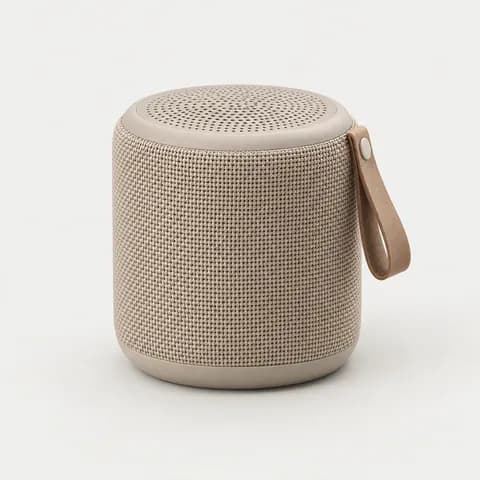 Pulse Mini Speaker$89.00 · NW-PM1 · 2025-11-12
Paste a list of pages and say which fields to keep. Each page becomes one record with the same fields, so Manus can put them straight into a spreadsheet.
Firecrawl maps the site to find the listing pages first, then Manus pulls the same fields from each one.
Firecrawl turns PDF, Word, Excel and PowerPoint files into clean markdown and searches research papers, so Manus can summarize and compare them.
# Annual Report 2025## Revenue by region| Region | 2025 || ------------- | ----- || North America | $468M || Europe | $271M || Asia Pacific | $203M | ## Highlights- Revenue +17%- Asia Pacific +28%- Gross margin 61%
Headings and tables stay in place, and scanned pages are read too, so Manus can summarize the numbers or compare two versions.
Firecrawl searches papers from PubMed, bioRxiv, medRxiv and arXiv. Manus reads the passages that answer your question and lists each paper with a link.
Track website changes on pricing, policy or careers pages. Firecrawl checks each page on the schedule you set, and Manus tells you exactly what changed.
Set the page and the time. When a plan, price or limit changes, you get the old and new values side by side.
Weekly checks on terms, privacy or careers pages show exactly which sentences were added or removed.
For a report at a fixed time, ask Manus to run on a schedule, read your monitors and write one summary.
See how scheduled tasks workMost “Firecrawl MCP Claude”, “Firecrawl MCP ChatGPT” or “web scraping MCP Claude” guides start by adding a server to that app. In Manus, Firecrawl is already in Connectors, so there’s no server to install or config file to edit.
In Manus, open Connectors and select Firecrawl.
Choose Connect and follow the steps to link your own Firecrawl account.
Say in plain words which site, pages or fields you want.
Good to know
 Notion connectorSave scraped pages and tables to Notion.
 Zapier connectorTake real actions across 8,000+ apps with Zapier MCP
Open Connectors in Manus, select Firecrawl and choose Connect, then follow the steps to link your own Firecrawl account. If you’re asked for a Firecrawl API key, create one on the API keys page of your Firecrawl dashboard and paste it in. After that, mention Firecrawl in a task.
Yes. Firecrawl is an MCP connector in Manus, and its tools come from the Firecrawl MCP server. You don’t install, host or configure a server yourself.
Manus can open and read web pages on its own, which is enough for a few sites. Firecrawl adds tools built for bigger jobs: crawling a whole site, scraping a batch of pages into the same fields, converting documents and checking pages on a schedule.
Yes. Firecrawl finds pages from the sitemap and the links on each page, and by default stays under the address you give. How many pages you can crawl depends on your Firecrawl plan and credits, because each page uses credits. You can set a page limit or include only paths like /blog or /docs.
Firecrawl returns markdown, HTML, links, screenshots or JSON with the fields you name. Manus can turn the results into a CSV or Excel file, a folder of markdown files, a report or a document, or add them to a connected app such as Notion.
You choose the schedule when you set it up, for example hourly, daily at 9am or weekly. The shortest interval Firecrawl allows is 5 minutes. Each check marks pages as same, new, changed or removed, and can notify you by email, webhook or Slack.
Yes. Put the schedule in your prompt, for example “Every Monday at 9am, summarize what changed on my Firecrawl monitors.” Manus saves it as a scheduled task, and you can find it later in Automations.
Scrapes, crawls and monitors use your own Firecrawl plan and credits, and each crawled page or PDF page uses credits. Check your Firecrawl plan for how many credits it includes. The task itself uses Manus credits like any other task.
No. Firecrawl Agent is Firecrawl’s own research feature. Manus is an independent AI agent that uses your Firecrawl account through the connector, and the same task can also create files, use your other connected apps and run on a schedule.
Yes. Firecrawl’s search tool finds web pages, news and images for a query, and Manus can scrape the results in the same task, for example to read the top articles on a topic and summarize them.
Yes. Apify has its own connector in Manus. Open Connectors in Manus to find it and other web data connectors.
Yes. Open Connectors in Manus, select Firecrawl and choose Disconnect. You can connect it again at any time.