Introducing Shopify on Manus: Build, Run, and Grow Your Store From One Chat

Introducing Shopify on Manus! Launch a store, manage your catalog, and run campaigns by talking to Manus— then go live when you're ready.
Simply describe the business you want to build, and Manus builds the storefront, and connects to Shopify. From there, the same chat is where you add products, read your sales, and run your next campaign. Shopify keeps doing what it does best in the background — hosting, payments, taxes, shipping — while Manus handles the day-to-day on top.
Getting Started
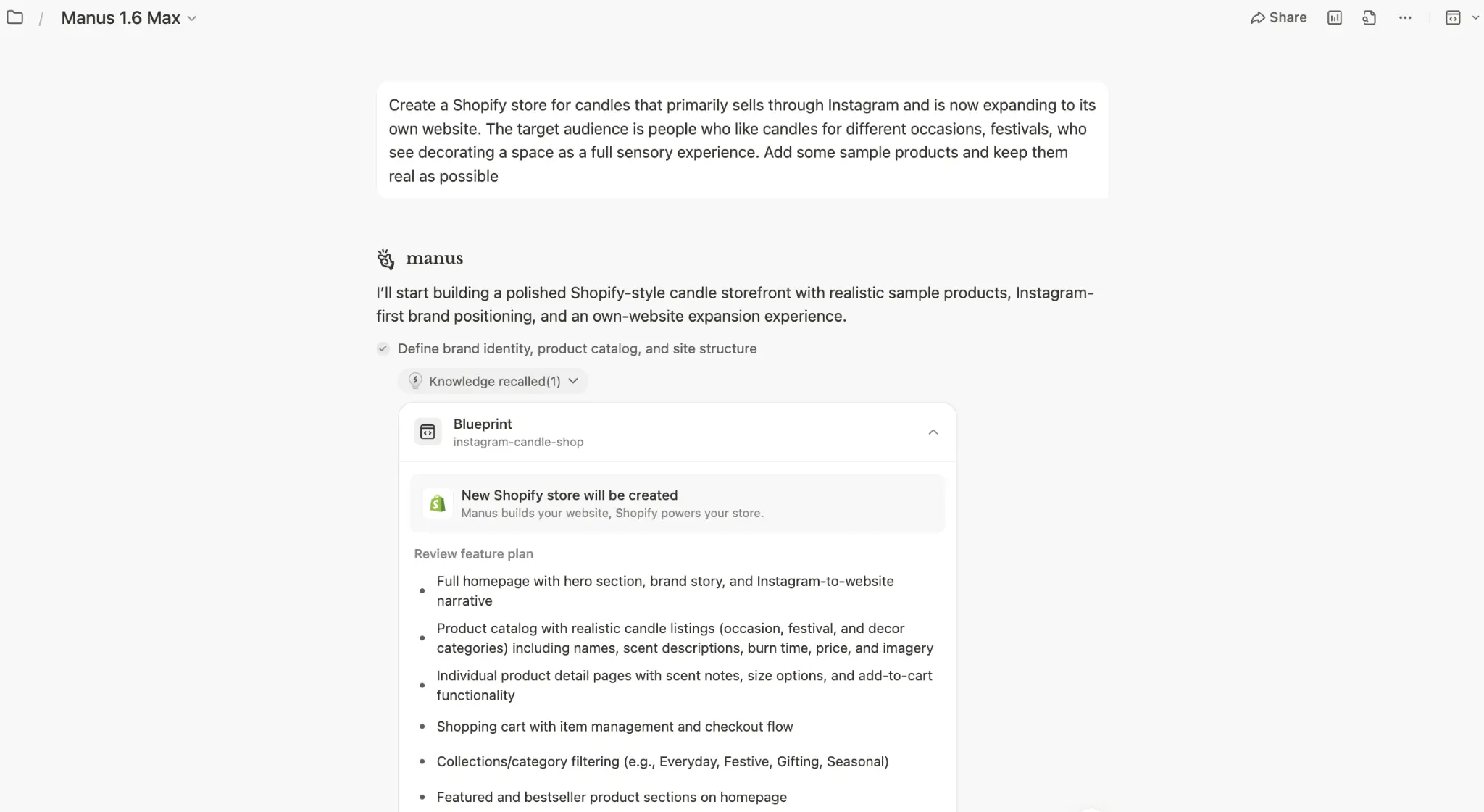
The simplest way to begin is to just ask. Tell Manus you want to create a Shopify store — what you sell, who it's for, the feel you're going for — and Manus will set up a Shopify development store for you and start building it. You don't have to pick a theme, write product copy, or set anything up beforehand. By the end of the conversation, you'll have a full draft store: branding, products, pages, and a working cart, all in your own Shopify environment.
When you're happy with what Manus has built and ready to take real orders, there's one last step that only you can do: claim the store. Click Claim, and under Integrations, sign in to Shopify, and the store moves out of development mode and into a live store under your name. Manus will prompt you when it's the right moment, so you don't have to think about it until you want to go live.

What It Can Do for You
If you already run a Shopify store, tasks that used to require coordinating across multiple tools and workflows now happen in a single chat now happens in a single chat against the store you already own — your admin keeps working the way it always has, and payments stay on Shopify.
If you're new to Shopify, you can start a free development store from Manus and go from idea to a real, ready-to-sell storefront in the same conversation, without learning a new tool first.
Build

You describe the business in one prompt. Manus drafts the blueprint, then builds the storefront against your connected Shopify store — branding, navigation, hero, product grid, product detail pages, and a cart that routes to Shopify checkout.
Use it to:
•Launch a new brand from scratch on a development store, then move to production when you're ready.
•Stand up a second storefront for a new market with localized copy and pricing.
•Rebuild your homepage around a hero collection, a campaign, or a new product launch.
•Stage a client store as a Shopify Partner before handing it over.
Prompts to start with:
"Create a Shopify store for candles that primarily sells through Instagram and is now expanding to its own website. The target audience is people who like candles for different occasions and festivals. Add some sample products and keep them as real as possible."
"Create a Shopify storefront for Mar & Co., a premium tinned fish business based in Singapore. Vintage editorial feel, warm neutrals, prices in SGD."
"Rebuild my homepage around one hero collection — the Curator's Starter Kit — with social proof underneath and a recipe section at the bottom."
"Stand up a second storefront in my dev store for a Japan launch. Same brand, Japanese copy, JPY pricing."

Manage
Most merchants don't start in Shopify. They start in an Excel sheet of SKUs and a folder of product photos. Manus handles that. With the Shopify connector on, drop the spreadsheet and the images into the chat and Manus will write the listings into your store — matching images to SKUs, drafting descriptions in your brand voice, and organizing collections as it goes.

Use it to:
•Bulk-upload products from an Excel or Google Sheets file along with the matching product images.
•Audit your Products page for missing descriptions, alt text, or pricing and fix them in place.
•Reorganize SKUs into new collections and feature them on the homepage.
•Update inventory counts after a shipment and flag low-stock items.
Prompts to start with:
"Here's my supplier's Excel sheet and a folder of product images. Create Shopify listings for each row, match the right image to each SKU, and draft descriptions in our brand tone."
"Audit my Products page. Flag any listings missing alt text, descriptions, or pricing, and fix them in place."
"Move all sardine SKUs into a new collection called 'Smoke & Brine,' write a short collection description, and feature it on the homepage."
"My new shipment just landed. Update inventory counts from this spreadsheet and mark anything below five units as low stock."
Grow
With the Shopify connector, Manus can read your store's sales data and turn it into campaigns. Ask which products are slow movers, which collections are overperforming, or who your repeat customers are, and Manus will use the answer to brief itself — generating creative, copy, and offers grounded in your real numbers.

If you connect your email, social, or ad accounts as well, Manus can take the campaign all the way to the channel: drafting and scheduling the email, preparing the Instagram post, or staging the paid ad for launch.
Use it to:
•Clear slow-moving inventory with a targeted promo before a new season.
•Plan a 7-day push around a hero product, with landing page, social, email, and a paid ad.
•Win back repeat customers with a private code.
•Double down on the collection that's overperforming this month.
Prompts to start with:
"Use my Shopify data to identify the three slowest-moving products and create four Instagram ad creatives around them, each with its own promo code."
"Plan a 7-day promotional calendar for the Curator's Starter Kit — landing page, three Instagram posts, one email, and a paid ad."
"Pull my repeat customers from the last 90 days and draft a thank-you email with a private discount code."
"Which collection is overperforming this month? Draft a campaign brief to double down on it next month, with budget split across email and Instagram."
Availability
Shopify on Manus is rolling out today to all paid Manus tiers. It works with live Shopify stores and Shopify development stores. Setup walkthroughs and prompt patterns are in the Manus docs.
Common Questions
If you're a Manus user
Q: How does the integration actually work?
A: Manus uses Shopify's APIs to read and write products, prices, collections, and discounts directly into your Shopify dashboard. The storefront is built and served by Manus; Shopify runs underneath as the commerce layer for catalog, checkout, and payments. Changes on either side stay in sync.
Q: Do I need an existing Shopify account to start?
A: No. Design and populate your store in Manus first, then claim it when you're ready — Manus will prompt you to log in to Shopify or start a free trial at that point.
Q: How is this different from the Manus website builder?
A: The website builder makes standalone sites with no commerce backend. Shopify on Manus is built for commerce: Manus builds the storefront and Shopify handles catalog, checkout, payments, and fulfillment.
If you're a Shopify merchant
Q: Does Manus replace my Shopify theme?
A: No. Manus builds a separate storefront that connects to your Shopify store on the backend. Your existing theme stays untouched; Shopify keeps managing catalog, inventory, orders, and checkout as usual.
Q: Where do my customers check out?
A: Checkout stays inside Shopify. Manus builds the front-end experience and hands the transaction off to Shopify's checkout when a customer is ready to pay. Manus never touches payments.
Q: Can I use this on a store that already has products and orders?
A: Yes. Manus can analyze your historical sales, surface slow-moving SKUs, and generate campaigns against your real catalog without disrupting your current setup.
Q: Does Manus access my customer data?
A: Manus reads product, inventory, and order-level data through Shopify's API to power features like campaign generation and sales analysis. It does not store customer PII (names, addresses, payment details) outside the session. All data access follows Shopify's OAuth scopes.
