Manus with Notion MCP: 5 Ways Users Are Transforming Work

Your Notion workspace is brilliant at organizing information. But what if it could do more than just store your ideas? What if it could execute them?
That is exactly what is happening with the Manus-Notion MCP integration. Through the Model Context Protocol, Manus can intelligently read from and write to your Notion databases, transforming your knowledge base into an execution engine. The result is a seamless bidirectional workflow where Notion remains your source of truth while Manus handles the heavy lifting.
We have been amazed by the creative ways our community is using this integration. Here are six real stories from users who turned manual, time-consuming workflows into intelligent automation.
Case 1: The Social Media Manager Who Automated a Month of Content
The Challenge: Creating content for multiple platforms is exhausting. Writing posts, formatting them for each channel, and manually entering everything into a content calendar takes hours every week.
The Solution: A social media manager gave Manus a single prompt to generate thirty posts on Instagram. But here is where the Notion MCP connector made it magical—Manus did not just generate the content. It automatically populated the manager's Notion Social Post Database with every post, perfectly formatted and structured. Then, a Make.com automation was set up to read from the Notion database and publish posts to social media platforms on schedule.
How It Works:
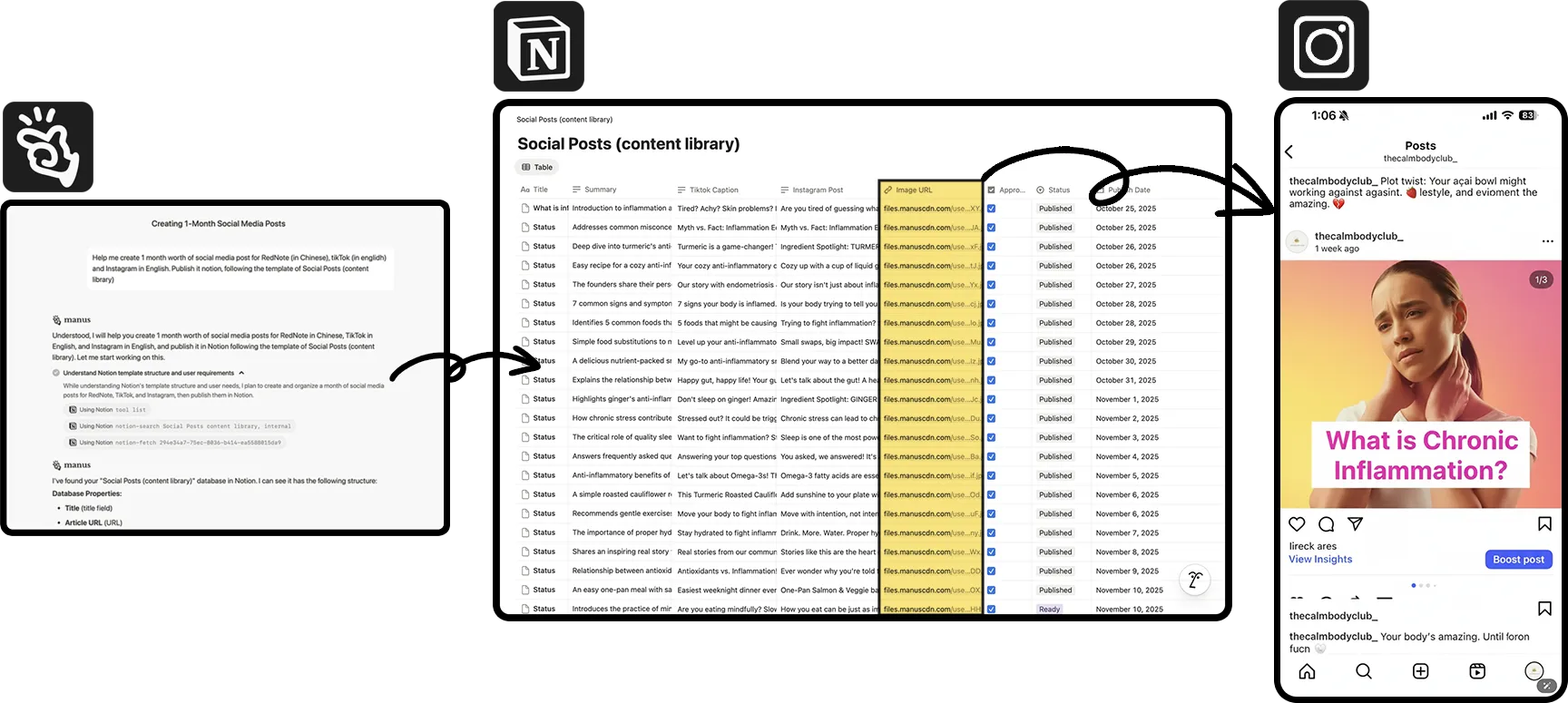
1.Manus generates content tailored for each platform with the right tone and format
2.Notion MCP reads the database schema to understand exactly how posts should be structured
3.Content auto-populates into Notion with all the correct fields: platform, post text, scheduling date, status
4.Make.com automation connects to the Notion database and publishes posts to Instagram, LinkedIn, and X daily at 11am
5.Performance stats flow back into Notion for analysis and optimization
This workflow showcases the power of connecting best-in-class tools: Manus for intelligent content generation, Notion for organization and structure, and Make.com for cross-platform publishing automation.
The database became a living content calendar. No more copy-pasting. No more manual data entry. Just one prompt, and a month of organized, ready-to-publish content appeared in Notion.
Case 2: The Marketing Team That Put Trend Research on Autopilot
The Challenge: Staying on top of TikTok trends requires constant monitoring. Every week, someone on the marketing team had to manually research trending videos, sounds, and hashtags, then brainstorm how to apply them to campaigns.
The Solution: The team set up a recurring Manus task that runs every Monday at 9am. Manus researches the latest TikTok trends, identifies viral content, and updates their Notion Trend Library database with trend names, audio links, example videos, and marketing integration ideas.
How It Works:

1.Scheduled task triggers every Monday morning automatically
2.Manus researches TikTok for trending videos, sounds, and hashtags
3.Notion gets updated with structured trend data: trend name, audio, examples, marketing angles
4.Team opens Notion to find fresh, actionable insights waiting for them
The power of this workflow is that Notion becomes their strategic command center. All trends are searchable, filterable, and organized. They went from reactive trend-chasers to proactive strategists overnight. The Notion MCP connector ensures that every piece of data lands in exactly the right place, maintaining consistency week after week.
Case 3: The HR Manager Who Turned a Static Page into an Interactive Web App
The Challenge: An HR manager had a comprehensive onboarding portal in Notion, but new hires found it overwhelming. They wanted something more interactive—progress tracking, an AI chatbot to answer questions, and a modern web interface.
The Solution: Manus retrieved the Notion content via the MCP connector, built a full-stack web application with progress tracking and an AI-powered FAQ chatbot, and deployed it to a public URL. The best part? Notion remained the source of truth. When HR updates content in Notion, the web app reflects those changes.
How It Works:

1.Notion stores the HR Onboarding Portal as structured pages and databases
2.Manus retrieves content via MCP, understanding the page structure and relationships
3.Full-stack web app is built with interactive features: progress tracking, AI chatbot, FAQ search
4.Two-way sync keeps Notion and the web app aligned—updates in Notion flow to the app, and completion data flows back
This is a perfect example of how the Notion MCP integration enables transformation without disruption. The HR team did not have to abandon their Notion workflow or hire developers. They simply extended their existing content into a powerful, interactive experience.
Case 4: The Entrepreneur Who Went from Idea Product Sourcing
The Challenge: An entrepreneur had a product idea for eco-friendly notebooks but needed to find suppliers, understand costs, and create a business strategy. Manually researching thirty suppliers, vetting them, and drafting outreach emails would take days.
The Solution: The entrepreneur asked Manus to find notebook and journal suppliers, evaluate them based on specific criteria, and draft personalized emails. Manus delivered a complete supplier database in Notion with contact information, cost breakdowns, selection criteria, and draft emails—all organized and ready to use.
How It Works:

1.Manus searches for thirty suppliers that match the product requirements
2.Notion database is created with structured fields: supplier name, contact info, pricing, criteria scores, draft emails
3.Automation reads the Notion template and sends mass emails based on selected suppliers
The Notion MCP connector made this possible by allowing Manus to structure the data exactly how the entrepreneur needed it. The database became the foundation for the entire business strategy—tracking supplier communications, comparing costs, and managing the selection process.
Case 5: The Developer Who Turned a GitHub Repo into a Searchable Notion Database
The Challenge: A developer had one hundred AI prompt examples scattered across a GitHub repository. They wanted these organized in a searchable, filterable Notion database for easy reference and sharing with their team.
The Solution: Manus used Wide Research to access all one hundred case folders in the GitHub repository, extracted the English-language prompts, and created a structured Notion database with fields for case number, case title, GitHub URL, prompt text, and notes.
How It Works:
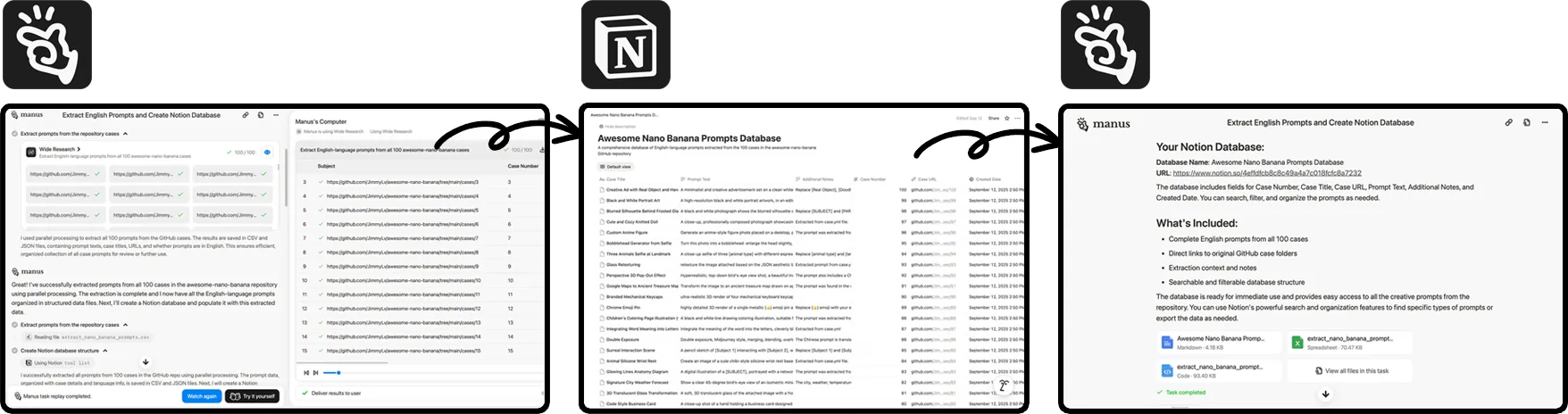
1.GitHub repository contains one hundred prompt examples in separate folders
2.Manus extracts data from all cases using Wide Research to process them in parallel
3.Notion database is created with structured fields and direct links back to GitHub
The result was a fully searchable, filterable database ready for immediate use. The developer could now use Notion's powerful search and organization features to find specific types of prompts, tag them by category, and export data as needed. The Notion MCP connector ensured that every prompt was properly structured and linked.
The Power of Notion MCP: Why This Integration Changes Everything
What makes these stories possible is the Model Context Protocol (MCP)—a standard that allows Manus to interact with Notion as more than just a data source. Here is what the Notion MCP connector enables:
Bidirectional Data Flow
Manus does not just read from Notion or write to it. It does both, creating true workflows where Notion remains the source of truth while execution happens automatically. Updates in Notion trigger actions in Manus. Results from Manus flow back into Notion.
Schema Understanding
The MCP connector understands your Notion database structure—fields, types, relationships, and templates. When Manus populates a database, it respects your existing structure, ensuring consistency and eliminating manual cleanup.
Automation Triggers
By connecting Notion to Manus, you can create workflows that run on schedules, respond to database updates, or trigger based on external events. Your Notion workspace becomes the control center for intelligent automation.
Seamless Execution
You do not need to export data, switch tools, or manually transfer information. Manus works directly with your Notion workspace, executing tasks and updating databases in real time.
What Will You Build?
These six stories are just the beginning. The Manus-Notion MCP integration is enabling users to:
•Automate research and populate databases with structured findings
•Transform static pages into interactive web applications
•Schedule recurring tasks that keep Notion databases fresh and up-to-date
•Execute complex workflows that span multiple tools and platforms
•Extend Notion's capabilities without leaving the Notion ecosystem
Your Notion workspace is no longer just a place to store information. It is a launchpad for intelligent, automated workflows that turn ideas into execution.
Ready to see what is possible? Explore the  Manus-Notion MCP integration and start building workflows that transform how you work.
All workflows shown in this article are real examples from the Manus community. Special thanks to the users who shared their stories and inspired others to rethink what is possible with Notion.
