The 8 Best AI Text Generators for Every Writing Task in 2026 (Tried & Tested)

In the ever-evolving landscape of digital content, AI has become an indispensable partner for creators, marketers, and businesses alike. The days of AI as a simple grammar checker are long gone. Today, the best AI text generators are sophisticated tools that can brainstorm ideas, draft entire articles, and even automate complex content workflows. But with so many options on the market, how do you choose the right one for your needs?
As a content writer deeply embedded in the world of AI, I've spent countless hours testing and evaluating these tools. In this guide, I'll take you through a hands-on review of the top 8 AI text generators of 2026. I've put each one to the test with a prompt tailored to its specific strengths, giving you a real-world look at how they perform.
The Best AI Text Generators of 2026 at a Glance
For those who want a quick overview, here's a summary of the top AI text generators and what they excel at:
Tool | Best For | Starting Price |
Manus | All-in-One Content Creation | Free Plan, $40/mo |
Jasper | Brand-Consistent Marketing Copy | $69/mo |
Copy.ai | Sales Emails & Outreach | $29/mo |
ChatGPT | Versatile Quick Drafts | Free Plan, $20/mo (Plus) |
Rytr | Quick Social Media Posts | Free Plan, $9/mo |
Writesonic | SEO-Optimized Snippets | Free Trial, $49/mo |
Anyword | High-Converting Ad Copy | Free Trial, $49/mo |
QuillBot | Paraphrasing & Rewriting | Free Plan, $8.33/mo |
1. Manus – Best for All-in-One Content Creation
Key Features
•Versatile Content Generation: Capable of generating a wide array of short-form content, including social media copy, ad copy, and product descriptions, often in a single request.
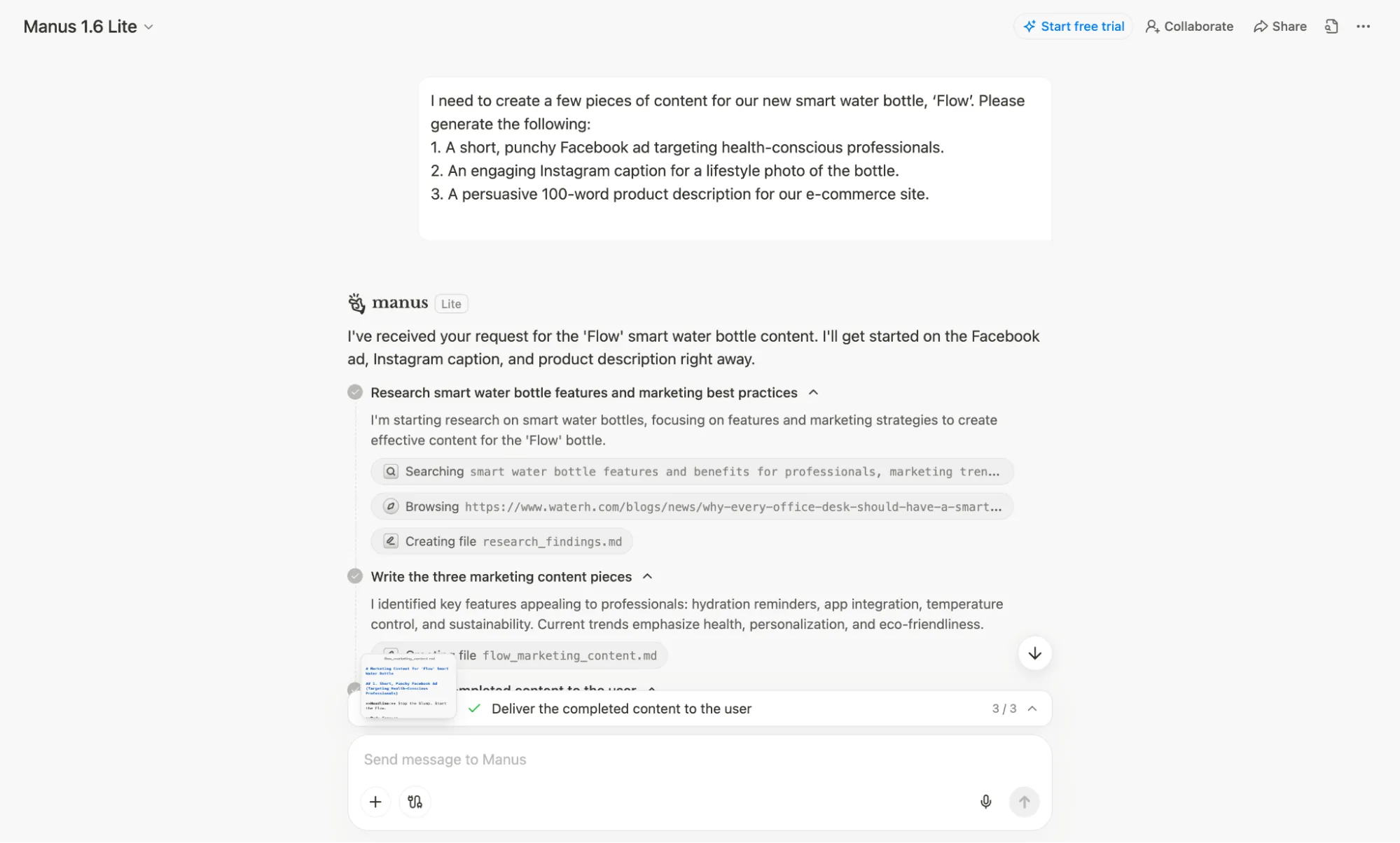
•Transparent Agent Workflow: Uniquely shows the step-by-step process the AI agent takes, from browsing the  web for research to creating and writing files, offering assurance and insight into the output.
•Project-Based Context: Maintains context throughout a project, ensuring consistency and relevance across different types of content generated for the same campaign or product.
My Experience
I tested Manus using its free trial. The interface was immediately intuitive, presenting a clean text box with helpful category buttons like "Create Slides" and "Develop Apps" to give the agent initial context. For my test, I simply used the main chat and gave it a single, consolidated prompt asking for a Facebook ad, an Instagram caption, and a product description for our test product, 'Flow'.
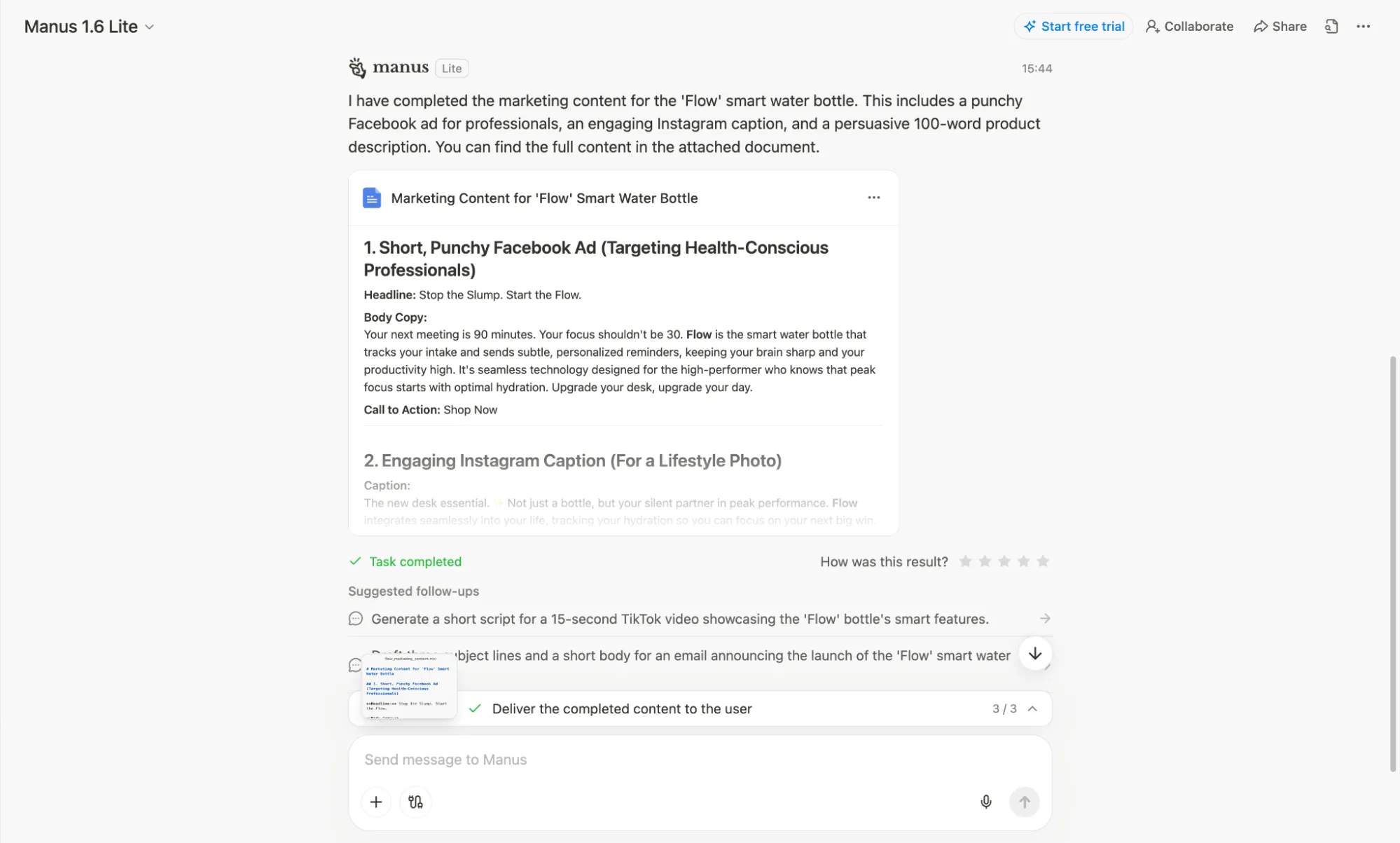
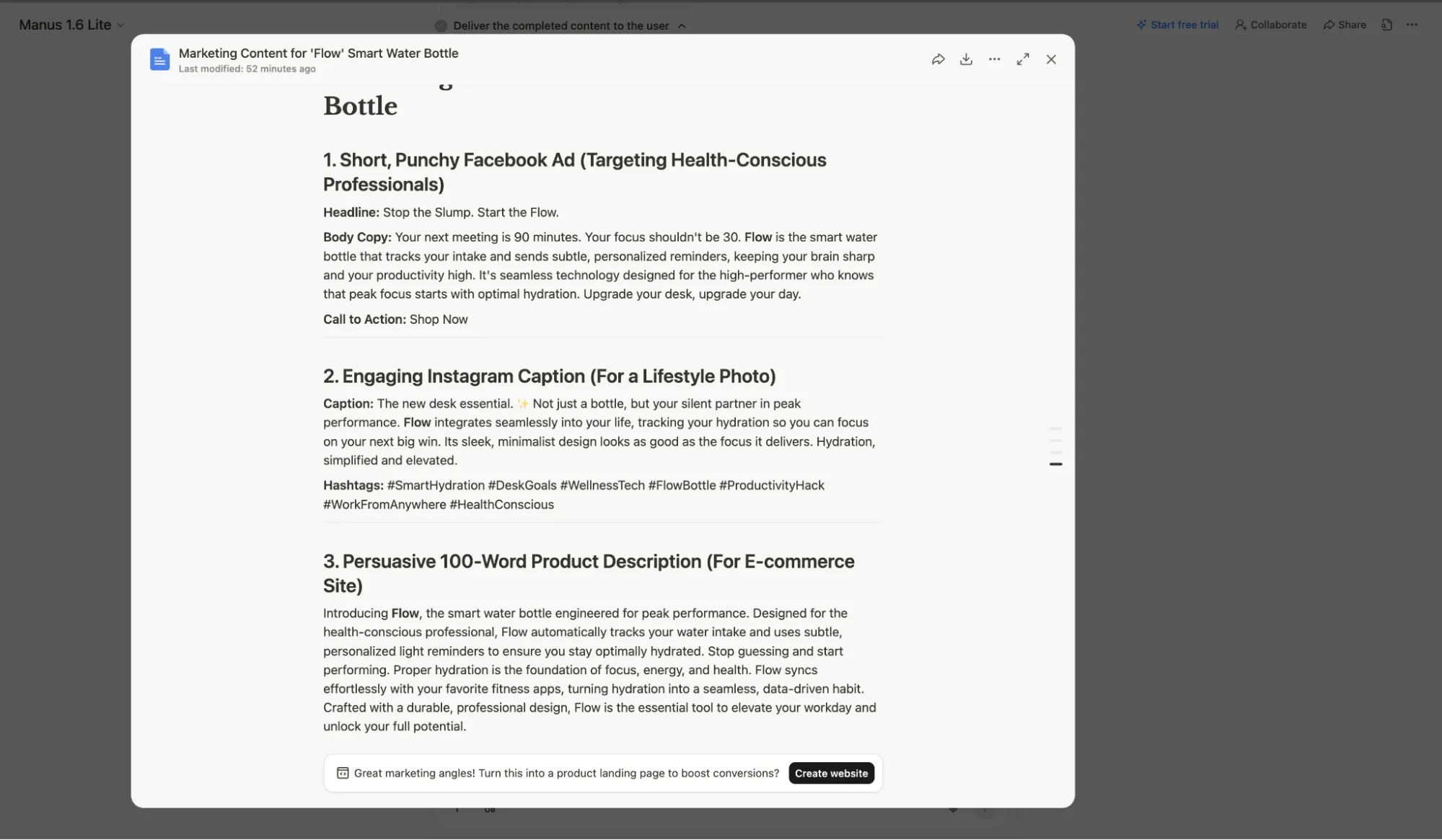
What happened next was fascinating. Instead of just getting an instant block of text, I could see Manus's "mind" at work as it detailed the steps it was taking. It performed market research by browsing the web, which clearly informed the final output. The copy it produced was not only high-quality but also contextually aware. The ad had a clear call-to-action, and the Instagram caption included relevant hashtags. It was impressive to see it handle multiple content types at once and exceed the prompt's requirements. The final output was delivered in a downloadable text file, with convenient options to export to Markdown, DOCX, or PDF, which is a great touch for team review workflows.
What I liked and What I didn't like
What I liked | What I didn't like |
All-in-one platform for multiple content types | Credit usage can be less predictable than a fixed monthly word count |
Transparent agent workflow shows the AI's process | Can be overkill for users who only need simple text generation |
High-quality, context-aware output | Newer platform, less established than competitors |
Convenient export options (MD, DOCX, PDF) | Many options and buttons, can be confusing for new users |
Pricing
You can get started with Manus through their free trial. Their pricing is based on a flexible credit system, with plans starting as low as $40 per month for 8,000 credits. This works out to $5 per 1,000 credits, and you can choose from a wide range of credit tiers up to $200 for 40,000 credits, with a 17% discount for annual billing.
All paid plans include the full suite of features, such as in-depth research, website and slide generation, and early access to beta features. The credit system allows you to pay for what you use, and you can easily scale your plan up or down as your needs change. There is also a custom Team plan available for larger organizations.
2. Jasper – Best for Brand-Consistent Marketing Copy
Jasper has long been a favorite among marketing teams, and for good reason. It excels at creating on-brand content at scale, thanks to its powerful brand voice features and an extensive library of templates designed specifically for marketing and sales copy.
Key Features
•Brand Voice & Jasper IQ: A standout feature that learns your brand's unique tone, style, and messaging, then applies it consistently across all generated content.
•50+ Marketing Templates: A vast collection of pre-built templates for everything from Facebook ads and Google headlines to blog post intros and product descriptions.
•Marketing AI Editor: A dedicated editor with features and workflows designed to streamline the creation of marketing materials.
My Experience
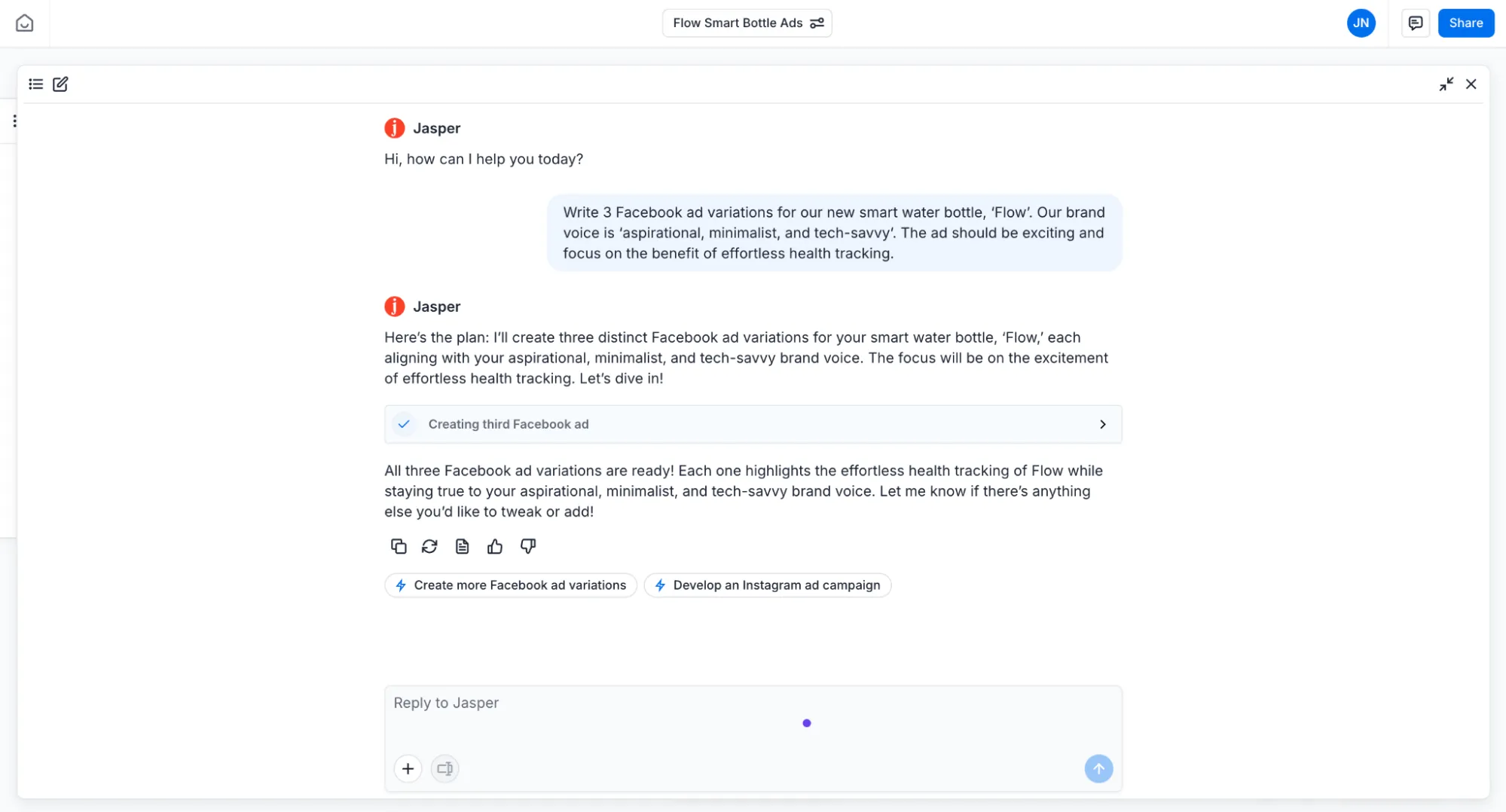
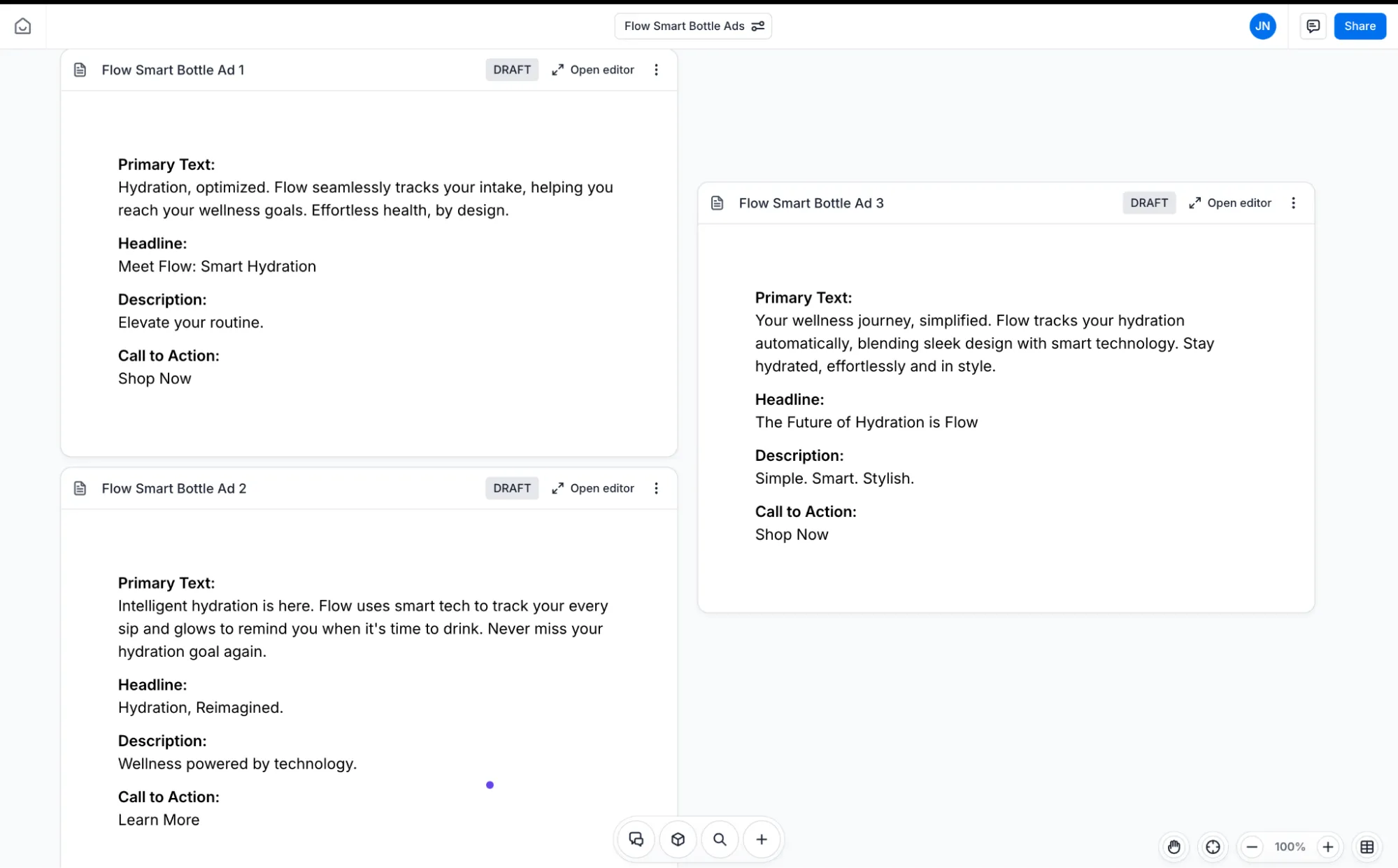
Since Jasper doesn't have a free plan, I used their 7-day free trial to test its capabilities. The interface felt familiar, much like a standard AI chatbot, but with a unique twist. The output appears in a separate window in a "scrapbook" style format, allowing you to drag, drop, and edit different pieces of copy. While this format didn't make a huge difference for my text-only prompt, I can see it being incredibly useful for visually comparing ad creatives or different versions of landing page copy.
I used Jasper's Facebook Ad template and defined a specific brand voice: 'aspirational, minimalist, and tech-savvy.' The ad variations it produced were creative and impressively consistent with the requested tone. However, while the copy was good, it felt very direct—it gave me exactly what I asked for, but didn't quite capture the subjective feeling of "excitement" from the prompt. This is a common trait in many text generators, but it's something to be aware of when crafting prompts with emotional nuance.
What I liked and What I didn't like
What I liked | What I didn't like |
Strong brand voice consistency | No free plan, only a 7-day trial |
Creative and varied ad copy | Can struggle with subjective or emotional prompt nuances |
Unique "scrapbook" interface for visual comparison | Output can feel very direct, lacking extra creative flair |
Good for long-form SEO content | Factual accuracy can be a concern and requires editing |
Pricing
Jasper does not offer a free plan, but you can test it out with a 7-day free trial. Their paid plans are geared towards professional marketers and teams, starting with the Pro plan at $69 per month per seat. This plan includes 2 Brand Voices and 5 Knowledge assets, which is great for core marketing workflows.
The higher-tier Business plan offers custom pricing and is designed for larger organizations that need advanced features like unlimited brand voices, custom workflows, and dedicated account management. This tier also includes access to Jasper's marketing Agents and a no-code AI App Builder, making it a powerful platform for complex campaign orchestration.
3. Copy.ai – Best for Sales Emails & Outreach
Copy.ai has strategically positioned itself as a Go-to-Market (GTM) AI Platform, making it a powerful ally for sales and marketing teams. Its feature set is finely tuned to streamline the often-tedious process of writing effective sales emails, outreach copy, and other GTM-related content.
Key Features
•AI-Powered GTM Workflows: Automates a wide range of tasks across the sales and marketing funnel, from prospecting to closing.
•Sales Email Generator: A dedicated and robust tool for crafting persuasive, high-converting sales emails.
•Prospecting Cockpit: A comprehensive suite of tools designed to assist with sales prospecting, research, and outreach.
My Experience
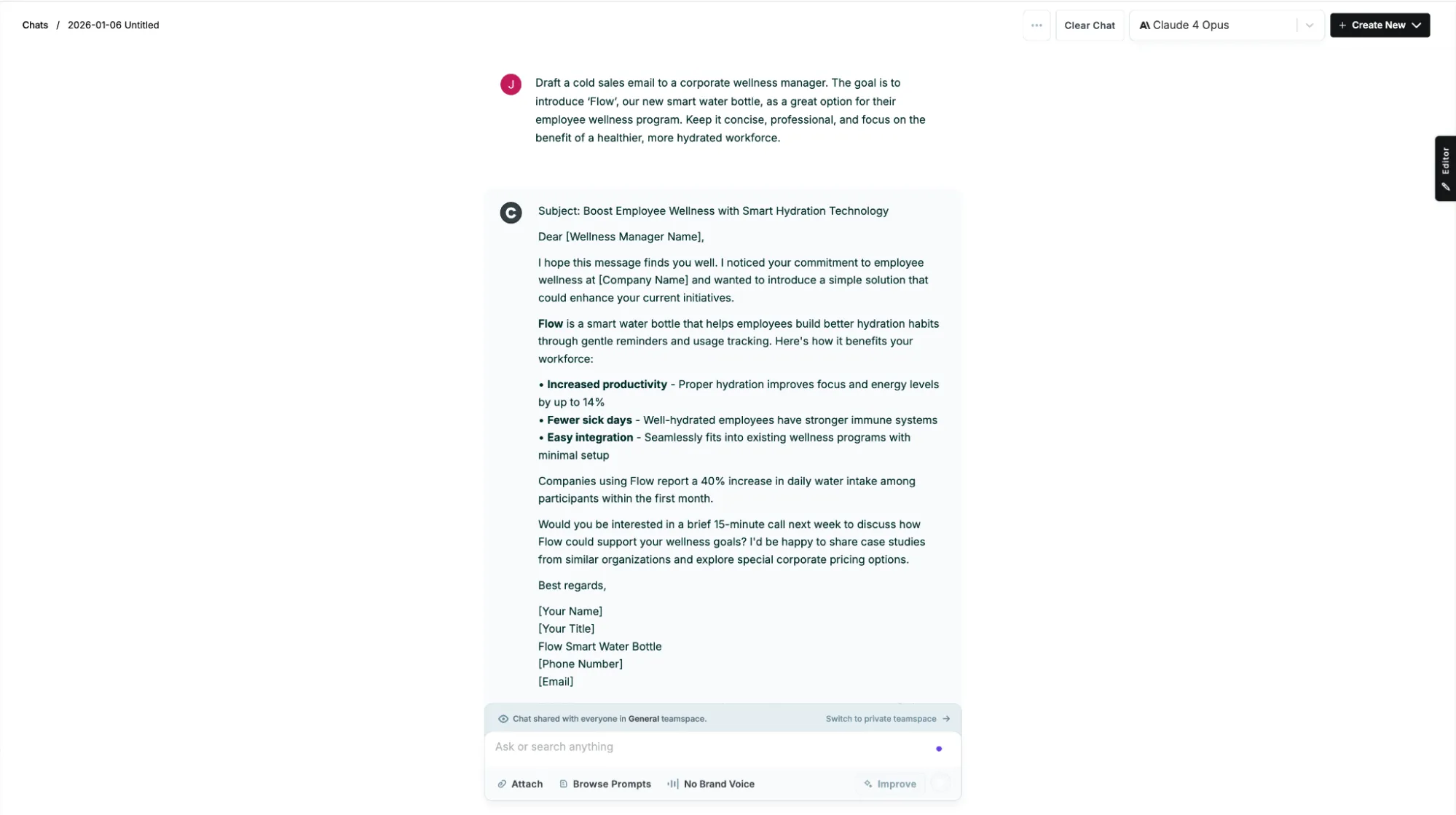
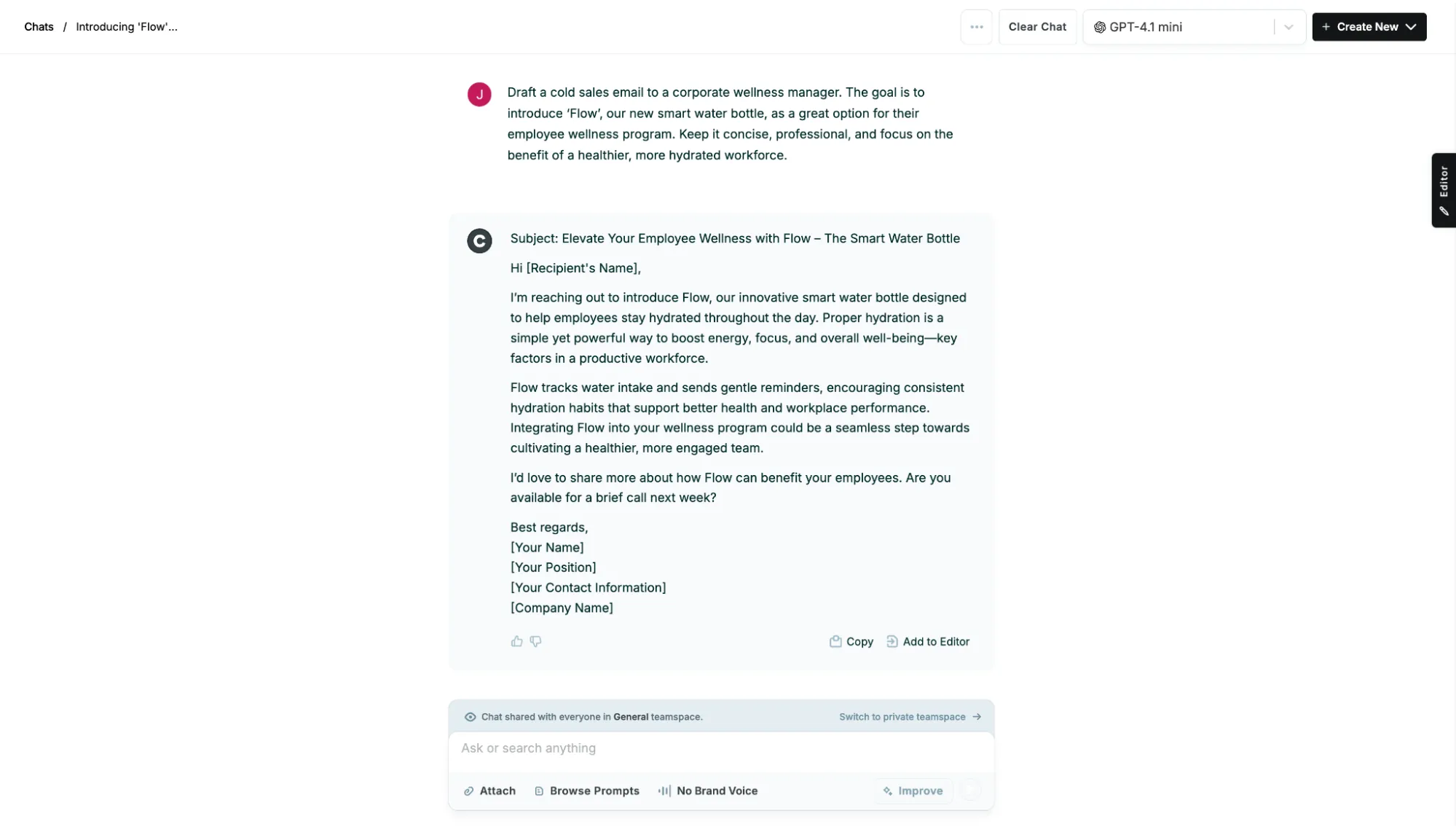
Without a free plan to test, I signed up for Copy.ai's Chat plan. Honestly, the most complicated part was just making the payment! Once I was in, everything was pretty easy to navigate. The chat interface is clean, and what immediately caught my attention was the ability to switch between different AI models like ChatGPT, Claude, and Gemini. This is a really cool feature because you can pick the model that suits your task best based on what each one is known for. It's clear that Copy.ai is a wrapper platform at its core, but it's laser-focused on short-form marketing copy, which you can tell from the buttons and layout of the interface.
What I found interesting was the prompt library, which is packed with marketing-specific templates, plus there's an option to set up a Brand Voice to keep your content consistent across projects. Now, the quality of the output? That really depends on which model you go with. I ran the same prompt through different models and got wildly different results, which was actually kind of fun to experiment with. If you enjoy tinkering and figuring out which AI works best for different tasks, Copy.ai gives you plenty of room to play.
What I liked and What I didn't like
What I liked | What I didn't like |
Excellent for sales and GTM content | No free plan available |
Access to multiple AI models (ChatGPT, Claude, Gemini) | Output is quite generic and often needs editing for final use |
Professional and concise email generation | Sales and marketing centered, not great for general creative writing |
Brand Voice feature keeps content consistent across projects | Can be slow or laggy when generating longer content |
Pricing
Since Copy.ai doesn't have a free plan, their pricing starts with the Chat plan at $29 per month. This plan is designed for small teams and includes 5 seats, unlimited words in chat, and access to multiple AI models. It's a solid choice for those starting to drive business value with AI.
For teams scaling AI with automation and brand-aligned content, Copy.ai offers the Agents plan at $249 per month. This popular plan includes 10 seats, unlimited words in chat, 10K workflow credits per month, and access to Content Agent Studio. The Agents plan is ideal for teams looking to leverage AI automation and create brand-aligned content at scale.
4. ChatGPT – Best for Versatile Quick Drafts
As one of the most well-known and widely used AI models, ChatGPT is the ultimate jack-of-all-trades. Its simple, conversational interface makes it incredibly easy to generate quick drafts, brainstorm ideas, and refine text through a series of follow-up prompts. It's the perfect tool for when you need a creative starting point without a steep learning curve.
Key Features
•Conversational Interface: The chat-based format allows for easy iteration, refinement, and exploration of different ideas in a natural way.
•Advanced Reasoning: Powered by OpenAI's latest GPT models, it delivers high-quality, human-like text for a vast range of tasks.
•Custom GPTs: The ability to create custom versions of ChatGPT tailored to specific tasks and workflows, enhancing its versatility.
My Experience
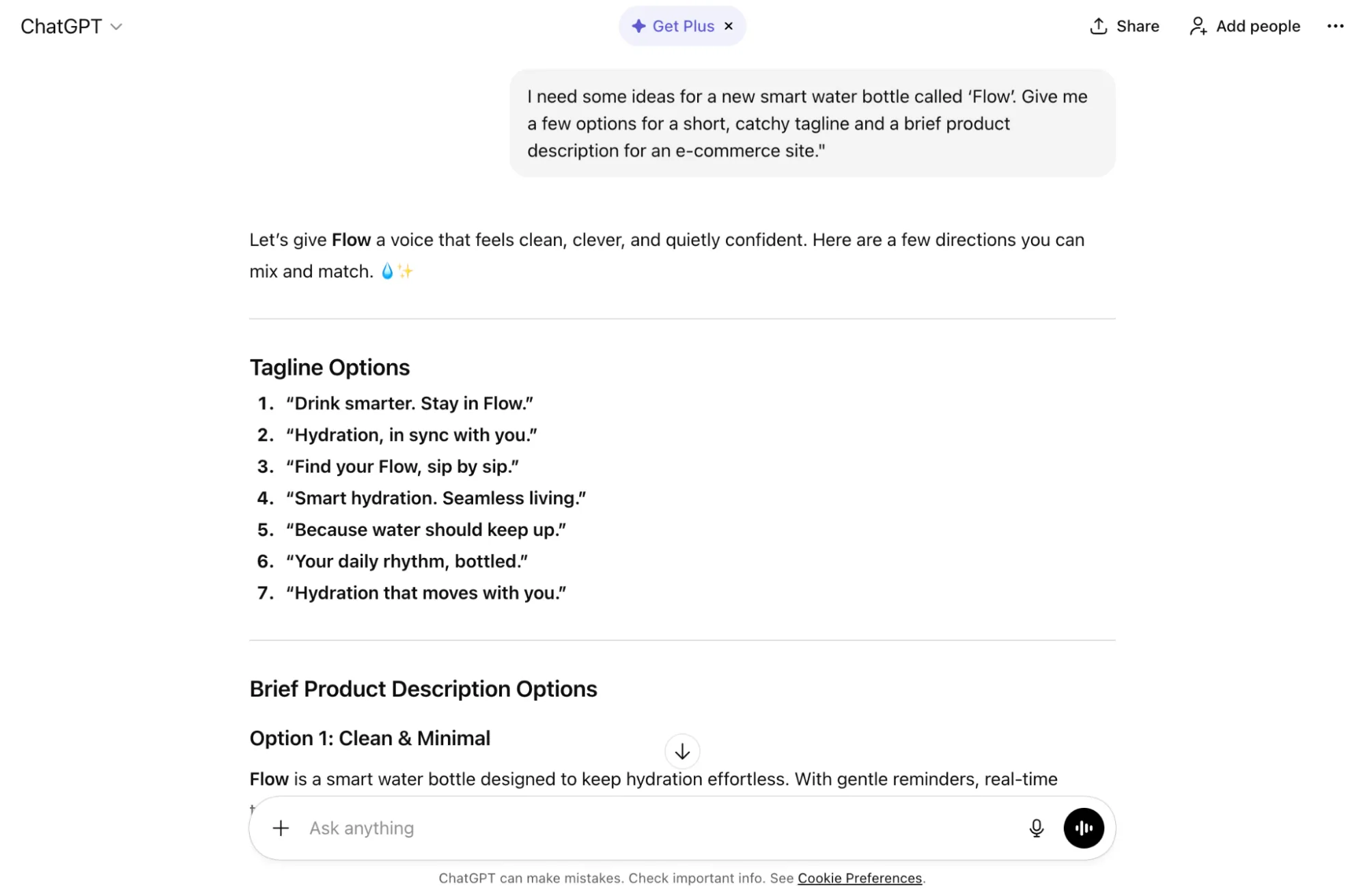
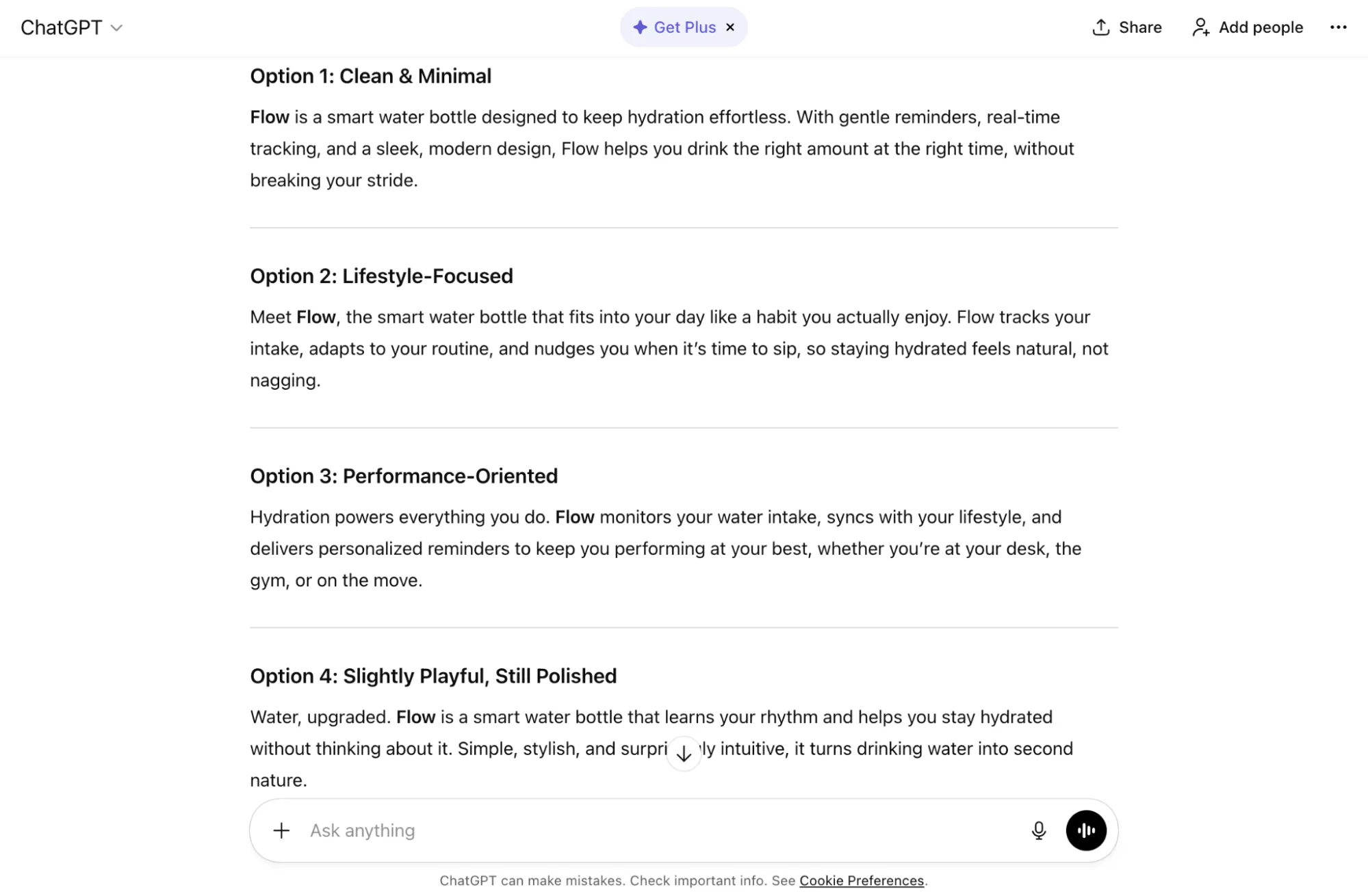
For this test, I used the free version of ChatGPT. Before I even started, it gave me the option to set a base tone and style, which I set to "quirky" to see how it would handle a more subjective instruction. The initial output provided several creative and varied options for both the tagline and the product description. While the taglines weren't necessarily "quirky," they were certainly creative and offered a good range of choices.
The real strength of ChatGPT lies in the follow-up conversation. I could easily ask it to make a tagline "more catchy" or a description "more persuasive," and it would instantly provide revised options. One minor critique is that it presented the taglines and descriptions as separate lists, requiring me to mix and match, but this was hardly an issue. While it may not have perfectly nailed the "quirky" tone, it delivered a wealth of creative and varied options to choose from.
What I liked and What I didn't like
What I liked | What I didn't like |
Incredibly versatile and easy to use | Free version can be slower and less capable than paid versions |
Excellent for brainstorming and quick drafts | Can sometimes fail to capture subjective tones like "quirky" |
Conversational interface makes iteration easy | Outputs can sometimes be generic without specific follow-up prompts |
Robust free version available | Requires good prompting skills for best results |
Pricing
With a robust free version accessible to everyone, ChatGPT is a great starting point for AI text generation. For those who need more power, the ChatGPT Plus plan is available for $20 per month, offering access to the latest models, faster responses, and features like DALL-E image generation and web browsing.
For heavy users and professionals, the Pro plan at $200 per month provides unlimited access to advanced reasoning models. For businesses, the Team plan ($25-30/user/month) and custom-priced Enterprise plan offer higher usage limits, enhanced security, and collaboration features.
5. Rytr – Best for Quick Social Media Posts
Rytr stands out as a lightweight, intuitive, and incredibly budget-friendly AI writer that excels at generating short-form content, especially for social media. Its simple interface and wide range of use cases make it a fantastic choice for individuals and teams who need to create engaging social content quickly and affordably.
Key Features
•40+ Use-Cases: A diverse library of templates for various content types, including a dedicated and effective social media post generator.
•20+ Tones: A wide selection of tones to choose from, allowing you to easily match your brand's social media personality.
•Built-in Plagiarism Checker: A handy feature to ensure that the content you generate is original and ready to post.
My Experience
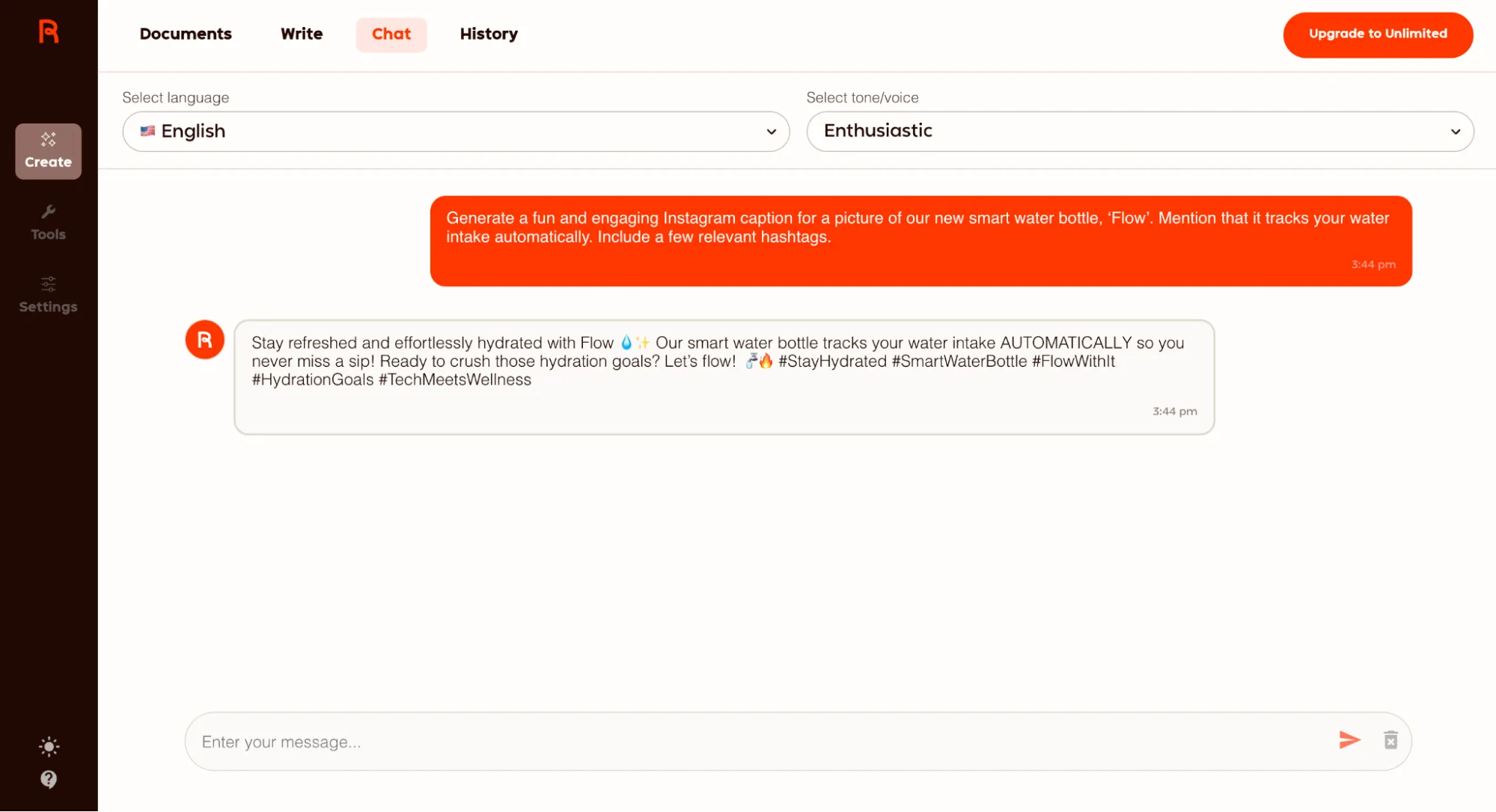
Taking advantage of its generous free plan, I put Rytr to the test. The interface immediately felt familiar, resembling a simple chatbot. I selected the 'Social Media Post' use case, chose an 'Enthusiastic' tone, and entered my prompt. I was immediately impressed by the speed. The response was generated almost instantly after I hit enter. It produced a few fun and engaging Instagram captions, complete with relevant hashtags.
For basic use and quick text generation, Rytr is an excellent tool. The responses can sometimes be a bit basic or generic, and the formatting of the output could be improved, but for the price—or lack thereof—it's hard to complain. It's undoubtedly one of the most budget-friendly options on the market, with its premium plan costing significantly less than many competitors' basic plans.
What I liked and What I didn't like
What I liked | What I didn't like |
Very generous free plan | Output can be basic and generic at times |
Extremely budget-friendly paid plans | Formatting of the output could be improved |
Fast and intuitive interface | Not as powerful for long-form or complex content |
Multi-language support | Quality can be inconsistent for technical topics |
Pricing
Rytr's generous free plan allows you to generate up to 10,000 characters per month, with access to AI Chat, 40+ use cases, 20+ tones, and a Chrome extension - all with no credit card required.
For those who need more, the Unlimited plan at $9 per month provides unlimited content generation, unlimited AI Chat access, 1 personalized tone of voice, 50 plagiarism checks per month, and 2X input/output character limits. The Premium plan at $29 per month is designed for freelancers creating content for multiple brands, offering access to their best AI outputs with premium language models, support for 30+ languages, 5 personalized tones of voice, 100 plagiarism checks per month, 3X writing tool character limits, and the ability to create custom use cases.
6. Writesonic – Best for SEO-Optimized Snippets
Writesonic is an all-in-one platform with a strong emphasis on SEO and content marketing. It's the perfect tool for creating short-form content that's designed to rank, with a focus on "Generative Engine Optimization (GEO)" to help you craft meta descriptions and other SEO snippets that perform well in search results.
Key Features
•AI Search Visibility Tracking: Track and improve your visibility in AI search results, a unique and forward-thinking feature.
•SEO-Optimized Templates: A variety of templates specifically for meta descriptions, headlines, and other SEO-focused content.
•AI Article Writer: While our focus is on short-form content, Writesonic also offers a powerful AI article writer for longer pieces.
My Experience
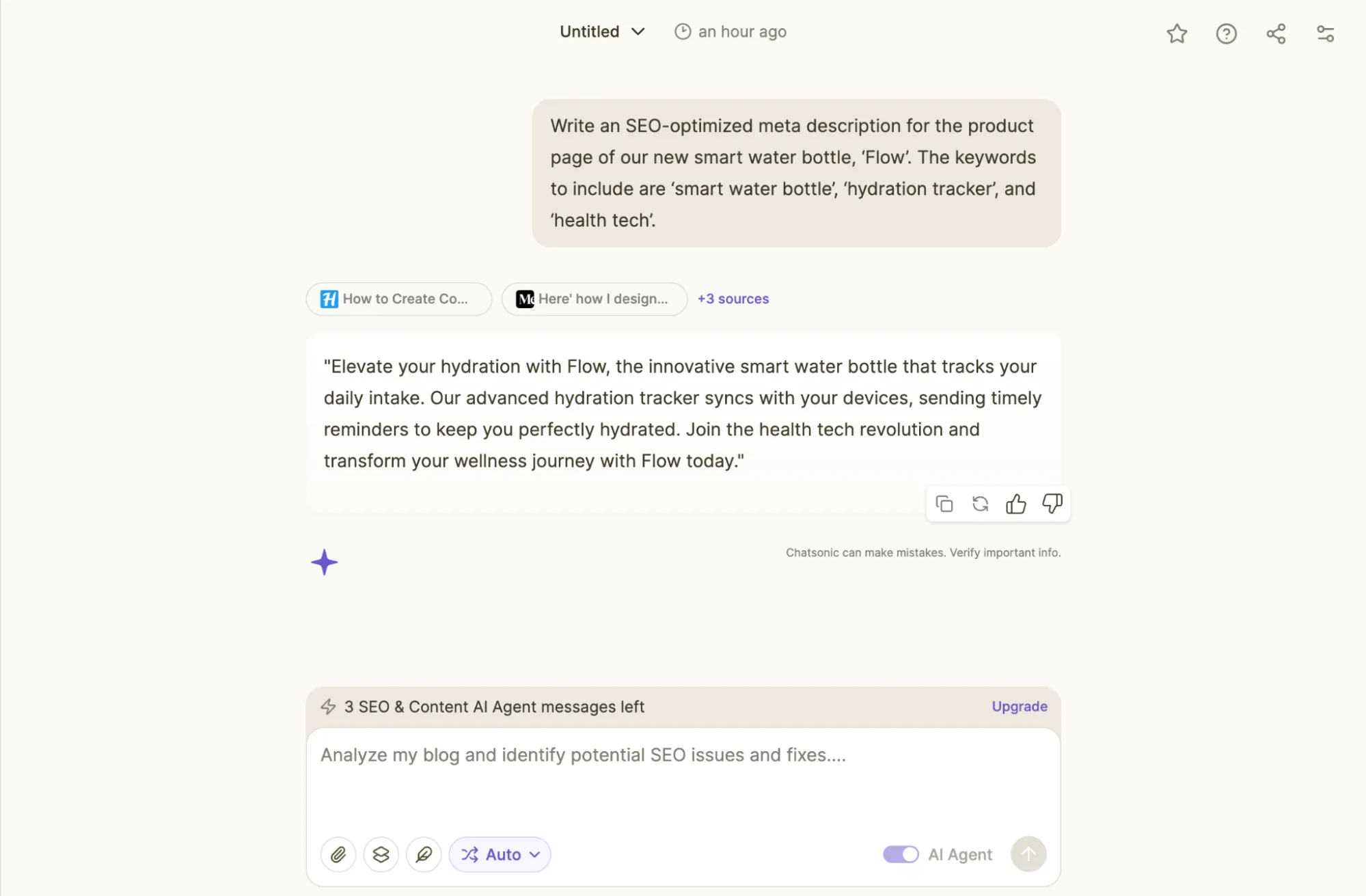
To explore its SEO capabilities, I used Writesonic's free trial. From the moment I landed on the homepage, it was clear that SEO is their specialty, with options for site audits, content generation, and SEO optimization tools. For my test, I used their chat function, "Chatsonic," to generate an SEO-optimized meta description.
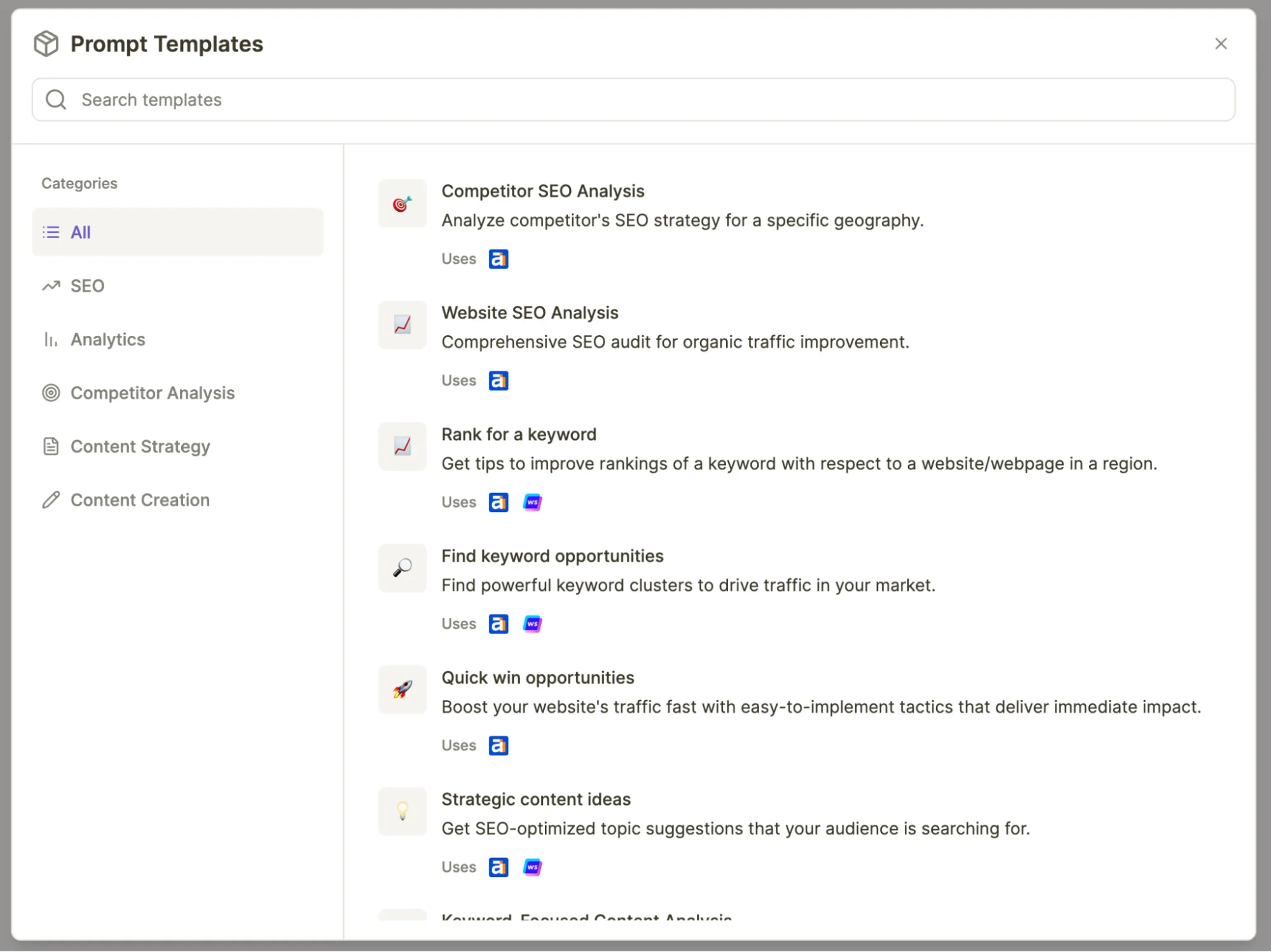
The platform also offers a wide range of prompt templates, which is incredibly useful for anyone new to SEO. While the initial output from my simple prompt was good and hit all the criteria, I quickly realized that to get the best results from Chatsonic, a more detailed prompt is necessary. This is likely because the tool is laser-focused on keyword optimization, and providing more context helps it generate more nuanced and effective copy. For anyone serious about SEO, Writesonic is a fantastic tool that can help at any stage of the content creation process.
What I liked and What I didn't like
What I liked | What I didn't like |
Excellent for SEO-focused content | Can be expensive for individuals or small businesses |
Provides AI search visibility tracking | Interface can be a bit cluttered with all the features |
Offers a free trial without a credit card | Learning curve for advanced features |
Access to multiple AI models | Article/audit limits based on plan |
Pricing
Writesonic offers a free trial to get started. Their paid plans range from the Lite plan at $49 per month to the Advanced plan at $499 per month. For short-form text generation, the Lite and Standard ($99/mo) plans are likely sufficient, offering 15-30 articles per month and access to Chatsonic.
The higher-tiered plans, like Professional ($249/mo) and Advanced, are geared towards serious SEO professionals and include AI Search Visibility (GEO) tracking, more articles, and unlimited AI agent generations. There is also a custom Enterprise plan for large brands and agencies.
7. Anyword – Best for High-Converting Ad Copy
Anyword is a data-driven AI writer that's laser-focused on one thing: creating high-converting ad copy. Its standout feature is the performance prediction score, which gives you an idea of how well your copy will perform before you even launch your campaign, a game-changer for performance marketers.
Key Features
•Performance Prediction: Get a predictive score for each piece of copy to gauge its potential performance and make data-driven decisions.
•A/B-Tested Data: The AI is trained on A/B-tested data, giving it a unique edge in generating copy that's designed to convert.
•Brand Voice Analysis: Ensures that your ad copy remains consistent with your brand's voice, even while optimizing for performance.
My Experience
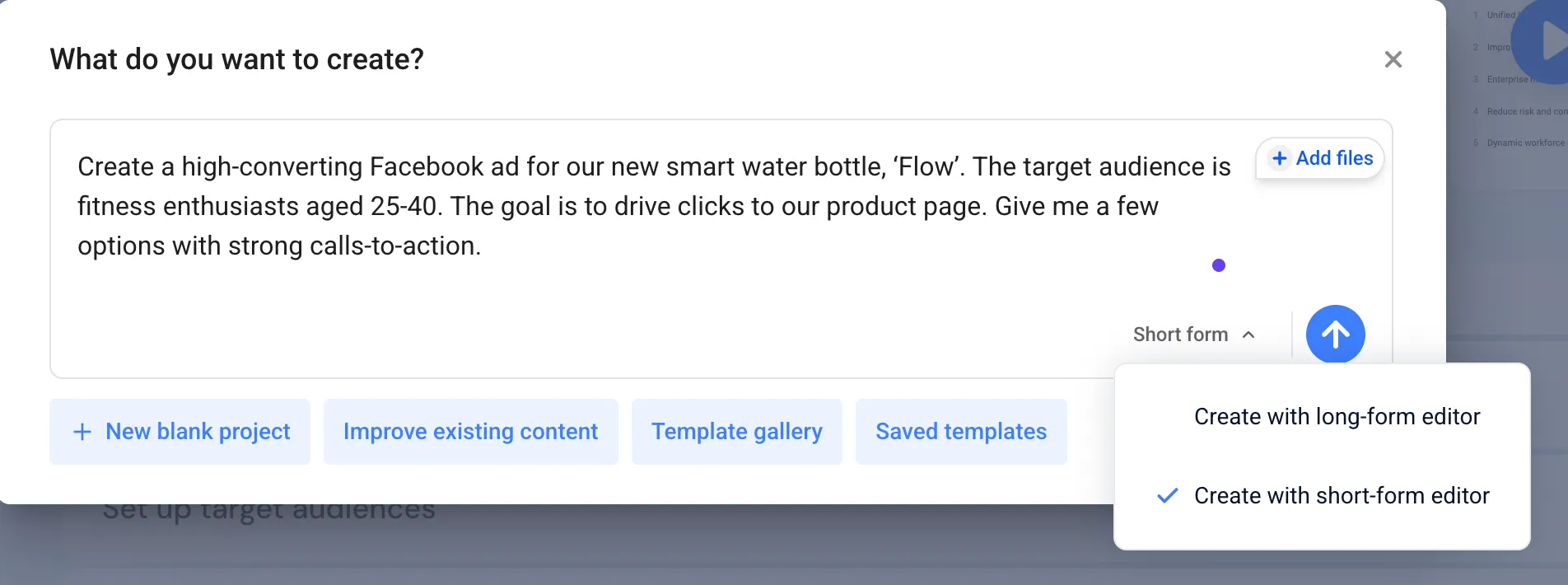
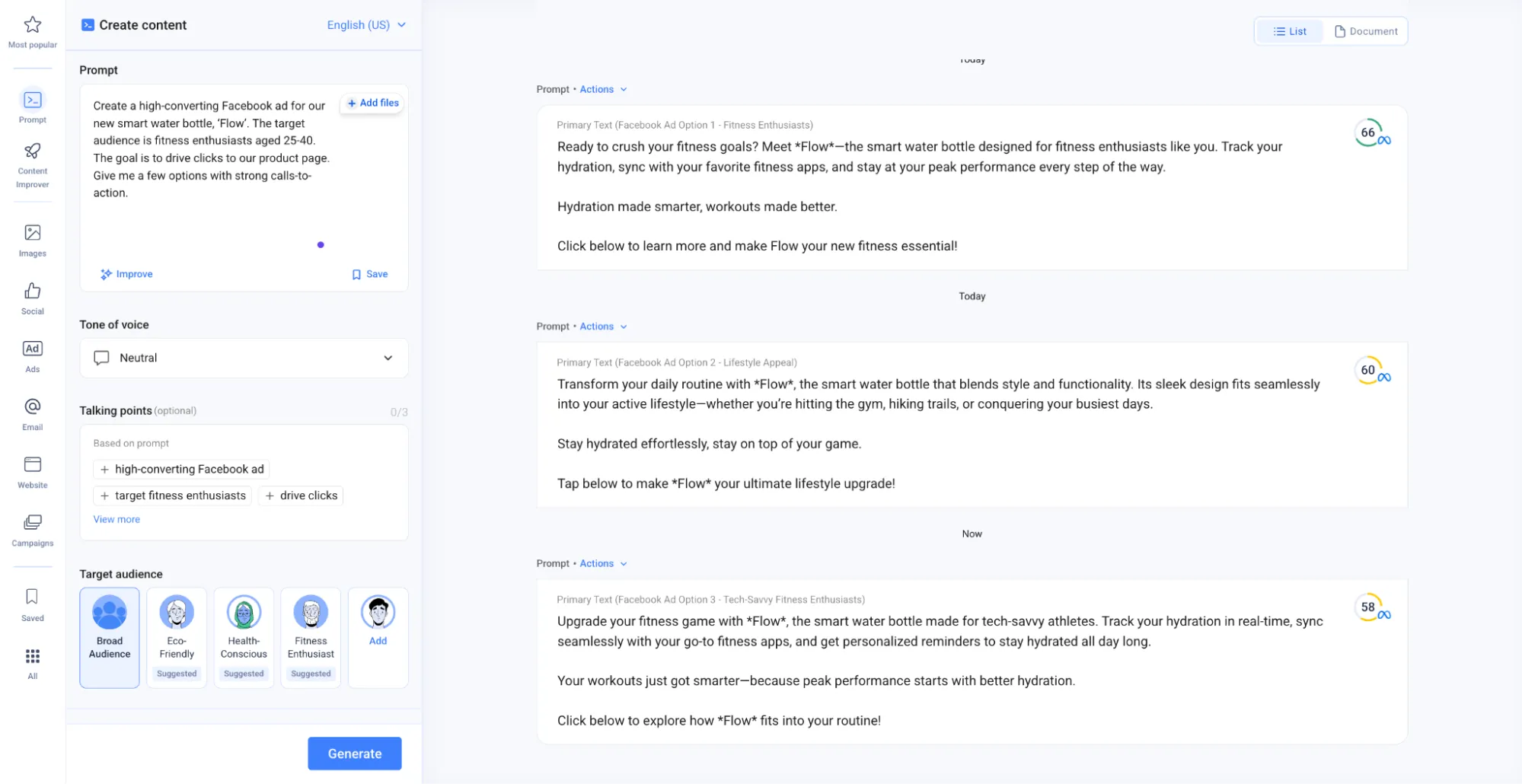
After signing up for the 7-day free trial, I jumped straight into generating Facebook ad copy with Anyword. Upon entering my prompt, I was met with a popup that asked if I wanted to improve existing content, use a template, or start a new project—a nice touch for guiding the user. After submitting the prompt, the interface changed to reveal a host of useful features. I could easily choose the tone of voice, and the main keywords and talking points were always visible, allowing me to add or edit them on the fly.
The most unique feature, of course, was the scoring. Each ad variation was given a "Meta Ad Primary Text Score," giving me a clear indication of which one was most likely to perform well. While I wasn't entirely sure how the score was calculated, it was a fascinating and powerful feature that sets Anyword apart from the competition. It's a tool that's clearly built for marketers who are serious about performance.
What I liked and What I didn't like
What I liked | What I didn't like |
Data-driven copy optimization with performance scores | No free plan, only a 7-day free trial |
Excellent for creating high-converting ad copy | Can be expensive for users who don't run a lot of ads |
A/B testing of copy to improve performance | Steeper learning curve than simpler tools |
100+ marketing templates and prompts | May not be as effective in certain languages |
Pricing
There's no free plan available, but Anyword offers a 7-day free trial to explore its features. The Starter plan at $49 per month is great for solo marketers and includes unlimited copy generation and 50 performance predictions. The Data-Driven plan at $99 per month is geared towards marketing teams and includes 3 seats and 100 performance predictions.
For larger teams, the Business and Enterprise plans offer custom pricing and include advanced features like custom-built AI models, real-time content intelligence, and automated website messaging A/B testing. These higher-tiered plans are designed for businesses aiming for superior performance across all marketing channels.
8. QuillBot – Best for Paraphrasing & Rewriting
QuillBot isn't a text generator in the traditional sense; instead, it's a powerful paraphrasing and rewriting tool. It's the perfect companion for when you have a piece of text that you want to improve, rephrase, or simplify. Its various modes allow you to transform your existing copy in a variety of ways, making it an essential tool for any writer's toolkit.
Key Features
•Advanced Paraphraser: Rewrite text in multiple modes, from 'Standard' to 'Creative,' to find the perfect phrasing.
•Grammar Checker: A robust grammar checker to ensure your writing is polished and error-free.
•Summarizer: Condense long pieces of text into a few key points, a great feature for research and analysis.
My Experience
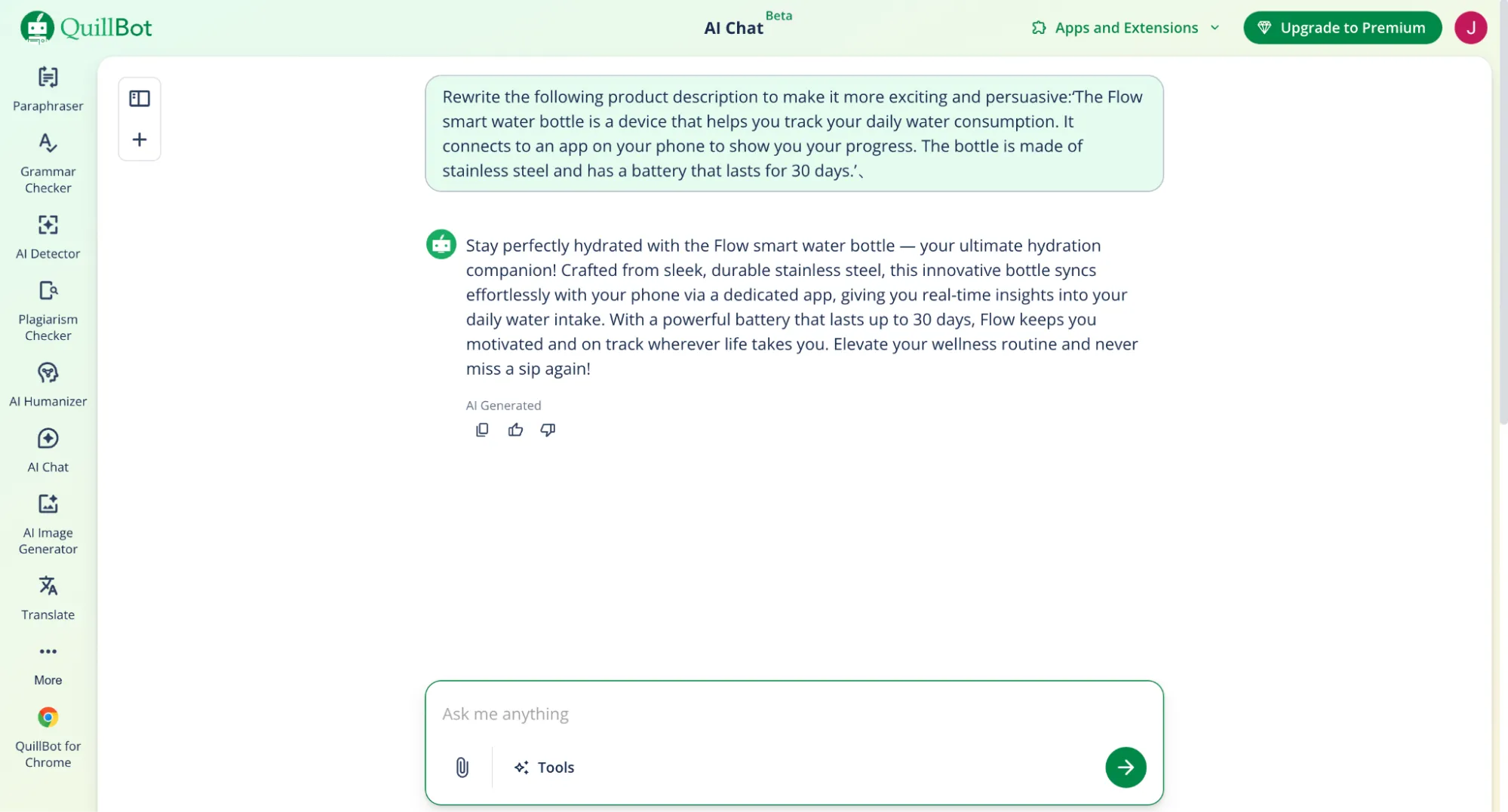
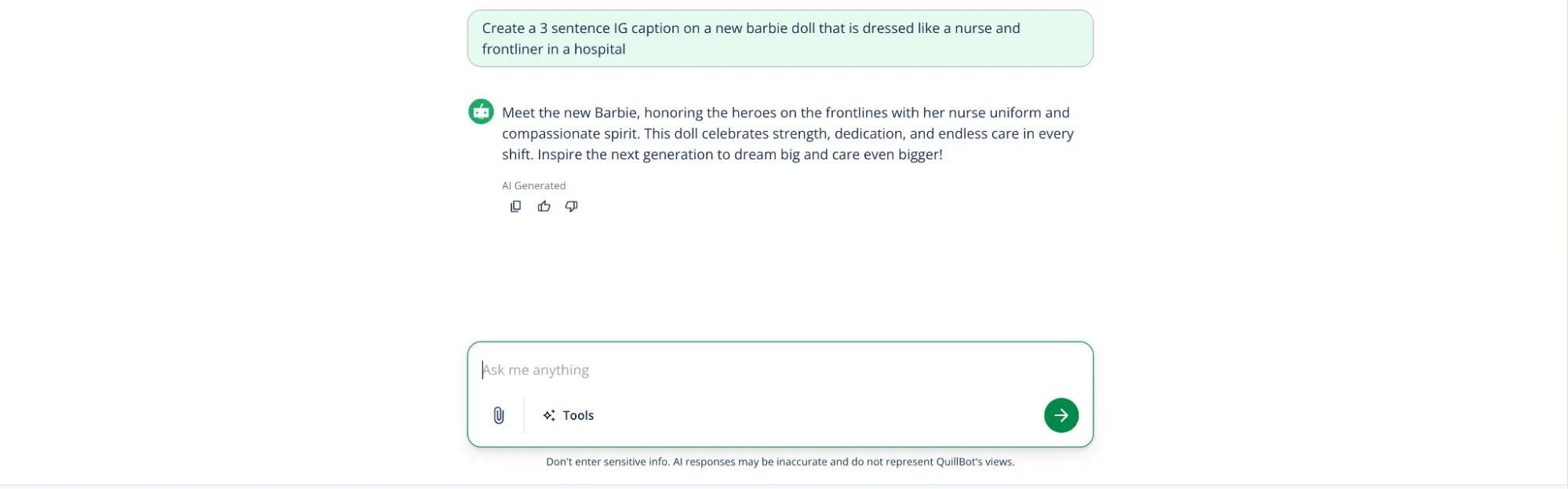
With the free plan, I decided to see what QuillBot could do. The interface is clean and straightforward, looking more like a text toolkit than a conventional AI model. The side tab offers a range of tools, including the Paraphraser, Grammar Checker, and even an AI Detector. I clicked on the "AI Chat" to test its generative capabilities, and while it did what it was told, the output was quite bland and lacked context.
However, when I used the Paraphraser to rewrite a bland product description, QuillBot truly shined. The 'Creative' mode produced a much more exciting and persuasive version of the text, while the 'Shorten' mode created a concise version perfect for a social media post. It's clear that QuillBot's strength lies in editing and improving existing text, and it excels at that task. As many online reviews have noted, it's an excellent tool for generating apt and relevant rewrites.
What I liked and What I didn't like
What I liked | What I didn't like |
Excellent for rewriting and improving existing copy | Not a text generator, so you need to start with existing text |
Multiple paraphrasing modes (9 in Premium) | Free plan has strict limitations (125 words) |
Generous free plan for basic paraphrasing | Output doesn't always pass AI detection |
Very affordable Premium plan | Can produce clunky output sometimes |
Pricing
Starting out is easy with QuillBot's free plan, which includes a 125-word limit on the paraphraser. For unlimited paraphrasing and access to all features, the Premium plan is available for $8.33 per month when billed annually (or around $19.95 monthly).
The Premium plan unlocks all 9 paraphrasing modes, advanced grammar recommendations, a plagiarism checker, and unlimited use of the AI Detector and Humanizer tools. There is also a custom-priced Team plan that includes a user management dashboard and centralized billing.
How to Choose the Right AI Text Generator for You
With so many great options available, choosing the right AI text generator can be a challenge. Here are a few questions to ask yourself to help you make the right choice:
What Is Your Primary Goal?
Are you looking to automate your entire content workflow, from research to publication? If so, a tool like Manus might be the best fit. If your primary goal is to create high-converting ad copy, then Anyword's performance prediction feature could be a game-changer. For those focused on SEO, Writesonic offers a comprehensive suite of tools to help you rank higher in search results.
What Is Your Budget?
If you're on a tight budget, Rytr and QuillBot offer generous free plans that allow you to get started with AI writing without any financial commitment. For those with a larger budget, premium tools like Jasper and Copy.ai offer more advanced features and capabilities.
How Important Is Brand Consistency?
If maintaining a consistent brand voice is a top priority, then Jasper's Brand Voice feature is a must-have. It allows you to train the AI on your brand's tone of voice, ensuring that all generated content is on-brand.
Frequently Asked Questions (FAQ)
Can AI-generated content rank on Google?
Yes, AI-generated content can rank on Google, as long as it's high-quality, relevant, and provides value to the reader. The key is to use AI as a tool to enhance your content, not to replace the human element entirely.
Will AI replace copywriters?
While AI can automate many aspects of the writing process, it's unlikely to replace human copywriters entirely. The best results are often achieved when humans and AI work together, with humans providing the creative spark and strategic direction.
What is the best free AI text generator?
Based on our testing, Rytr offers the most generous free plan for generating new content, while QuillBot is the best free option for paraphrasing and rewriting existing text.
The Verdict: What is the Best AI Text Generator in 2026?
After extensive testing, it's clear that the "best" AI text generator depends on your specific needs and goals. Here are my final recommendations:
•For the User Who Wants to Automate Everything: Manus is the clear winner. Its ability to handle complex, multi-step projects from start to finish makes it a true game-changer for content creation.
•For the Professional Marketer: Jasper's focus on brand consistency and its wide range of marketing templates make it the ideal choice for marketing teams.
•For the Budget-Conscious Writer: Rytr's generous free plan and affordable paid plans make it a great option for those who are just getting started with AI writing.
Ultimately, the best way to find the right AI text generator for you is to try them out for yourself. All of the tools on this list offer either a free plan or a free trial, so you can experiment and see which one best fits your workflow.
