I Tested Google Veo 3 and Here's My Honest Review
As a content writer at Manus, testing new AI tools is basically part of the job description. When Google Veo 3 dropped, the internet collectively lost its mind over the demos. Realistic talking heads, synchronized audio, cinematic visuals, all from a single text prompt. I've seen enough AI hype cycles to know that demos are curated and real-world results are a different story entirely.
So I decided to spend some time actually using Google Veo 3, running it through four distinct prompts designed to push its limits, and documenting everything honestly.
This is not a summary of Google's marketing materials. This is a hands-on Google Veo 3 review based on my real experience, including the parts that impressed me, the parts that frustrated me, and the parts that just straight-up didn't work. By the end of this article, you'll know exactly what Veo 3 is good at, where it falls short, whether it's worth the price, and how it compares to the competition.
What is Google Veo 3? (And What's New in Veo 3.1?)
Google Veo 3 is an advanced AI video generation model that creates high-quality video clips from a single text prompt. It supports synchronized dialogue, ambient sound effects, and background music, all from one prompt, and has quickly built a reputation for producing some of the most realistic AI-generated talking-head footage out there.
Veo 3 was first announced at Google I/O around mid 2025 and quickly became one of the most talked-about AI video generators of the year. The most recent update, Veo 3.1, brought meaningful improvements: better stability, more accurate lip-sync, more consistent character generation, and upscaling to 1080p and 4K. It's accessible through a few Google products — Google Flow, a professional-grade filmmaking tool built for editing and sequencing longer, more complex scenes, and Google Whisk, an experimental tool focused on rapid image-to-video generation and short clips. For this review, I tested through the Gemini app, where I simply selected the "Create video" tool pill and ran all four prompts from there.
My Hands-On Testing Process
To give this a proper test, I didn't want to just throw simple prompts at it and call it a day. I asked Manus to help me design four specific prompts to evaluate different capabilities: dialogue and lip-sync, cinematic atmosphere, product consistency, and fast-paced action. Here's how that process actually went.
How I Got Access (and How You Can Too)
Getting access to Veo 3 is honestly a bit confusing at first, and I think it's worth walking through because it's a common pain point.
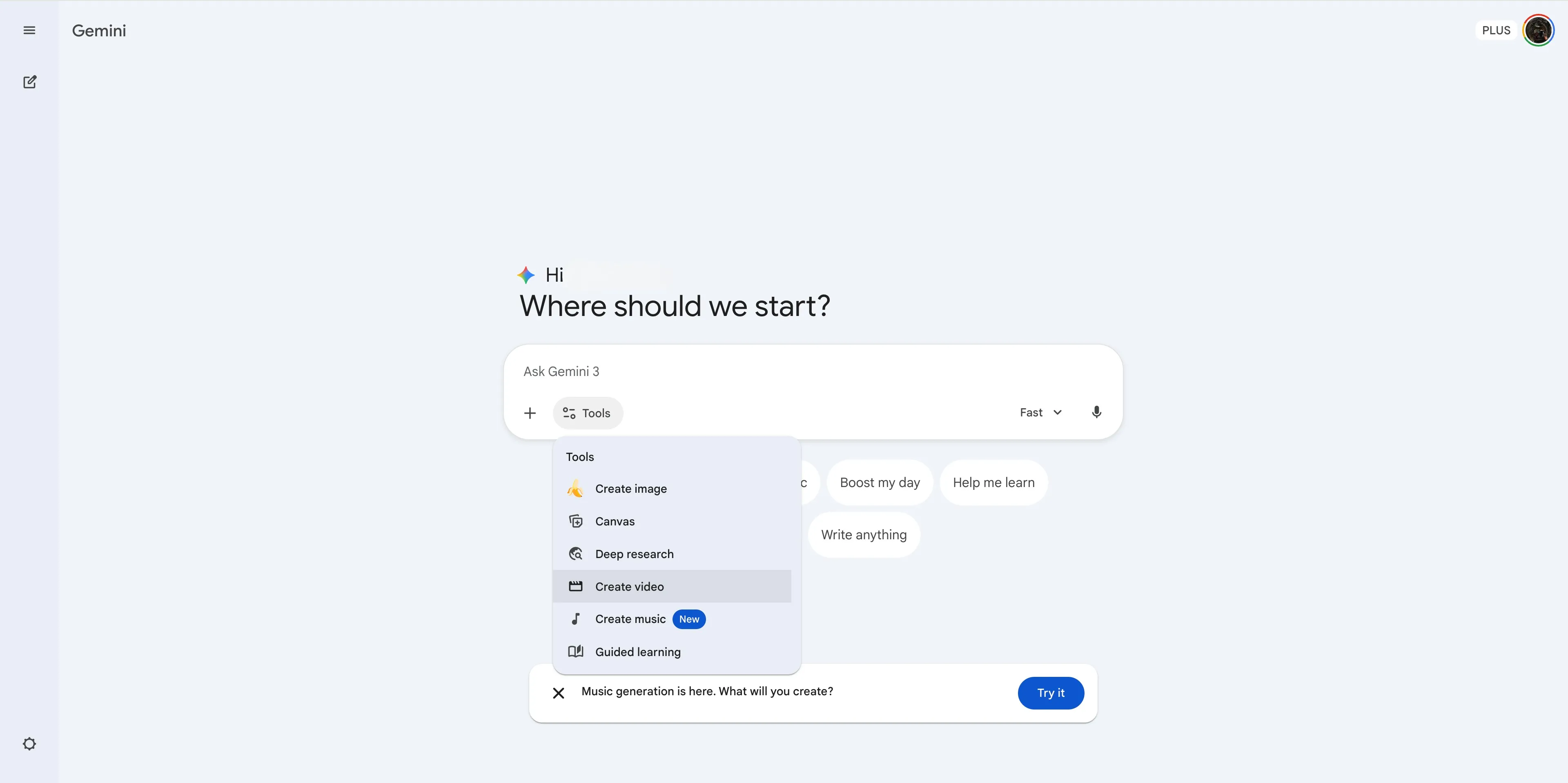
I started on the free account. The interface is pretty generic, similar to other AI tools, with a prompt box and some tool pills to choose from. There was no video generation option visible anywhere. I tried inputting my first prompt anyway, just to see what would happen.
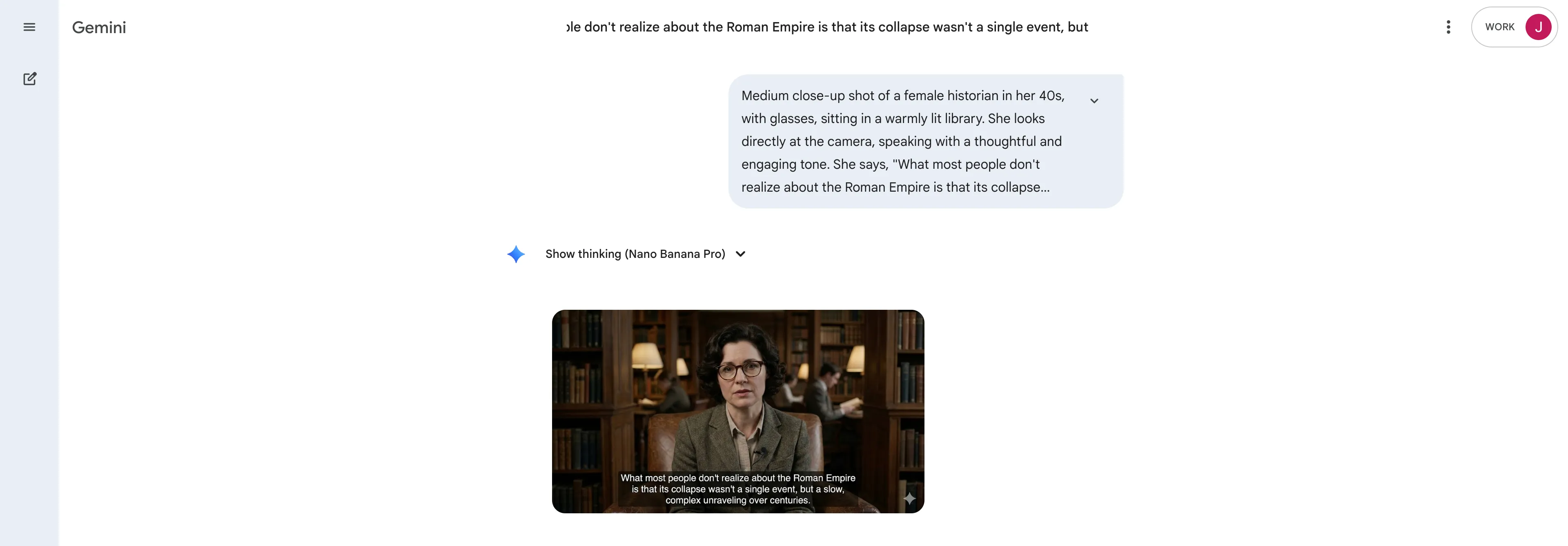
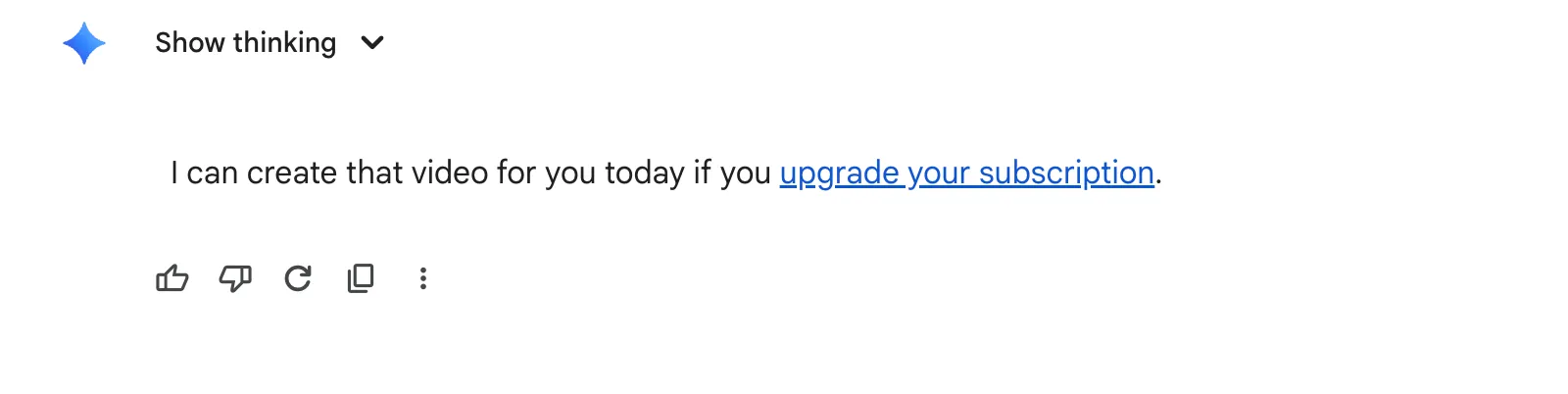
What I got back was an image, not a video. The image was actually impressive and matched the prompt well, but it was clearly not what I asked for. I then tried explicitly asking Gemini to create a video for me, thinking maybe it had just misread my intent. The response I got was: "I can create that video for you today if you upgrade your subscription."
So I went to look at the paid plans.
Here's the current breakdown of what each plan offers for video generation:
Plan | Monthly Price | AI Credits | Veo 3.1 Access |
Free | $0 | 50 daily credits | Limited access to Flow, Animate and generate images |
Google AI Plus | $7.99/mo | 200 monthly credits | More access to Flow and image-to-video generation on Whisk |
Google AI Pro | $19.99/mo | 1,000 monthly credits | Higher access to Flow and Whisk |
Google AI Ultra | $249.99/mo | 25,000 monthly credits | Highest access to Flow and Whisk |
The wording on the plans is vague. Google AI Plus says "more access to image-to-video creation with Veo 3" and Google AI Pro says "higher access." Not exactly crystal clear on what you're actually getting. I went with Google AI Plus first, since it was the next tier up and seemed like it would do the trick. Paid, subscribed, and off we go! On the plus plan, I could see the addition of the “Create Video” option which was previously unavailable on the free plan.
The 4 Prompts I Used to Test Veo 3's Limits
Here are the four prompts I put together to test different aspects of Veo 3's capabilities:
1.The Dialogue & Lip-Sync Test — To evaluate the core native audio feature with synchronized dialogue.
2.The Cinematic & Atmospheric Test — To assess how well it handles complex visual styles and camera direction.
3.The Product & Object Consistency Test — To check whether it can produce clean, professional product videos.
4.The Action & Motion Test — To see how it handles fast movement, dynamic camera work, and layered audio.
The Results: 4 Veo 3 Video Examples (The Good, The Bad, and The Glitchy)
Prompt #1: The Dialogue & Lip-Sync Test
Prompt Used: "Medium close-up shot of a female historian in her 40s, with glasses, sitting in a warmly lit library. She looks directly at the camera, speaking with a thoughtful and engaging tone. She says, 'What most people don't realize about the Roman Empire is that its collapse wasn't a single event, but a slow, complex unraveling over centuries.' Ambient noise: the quiet rustle of turning pages and the soft hum of library air conditioning. Style: Documentary interview, shot on a high-quality digital camera."
My Experience: Okay, I was genuinely blown away by this one. The process was smooth, and the video was ready in minutes. True story: while it was generating, I switched tabs to do other things. When I came back and saw the output, I actually thought a random ad had popped up on my screen. It looked that realistic. The historian, the lighting, the tone… everything was nailed. She spoke with natural inflections, pauses, and emphasis. Her facial expressions and hand gestures? Spot on. It was genuinely documentary-interview worthy.
The only things that felt a bit off were the aggressive dust motes floating in the sunlight, which were a little distracting. And while I asked for ambient library sounds, the model gave me a subtle background music track instead. But honestly? It was a smart executive decision. The music fit the documentary style perfectly, maybe even better than what I’d asked for. What a start!
What I Liked | What I Didn't Like |
Incredibly realistic and natural-looking character | Dust motes in the sunlight were a bit distracting |
Perfect lip-sync with natural speech inflections | Ignored the specific ambient sound request (but made a good call) |
Captured the documentary interview style perfectly | |
Prompt #2: The Cinematic & Atmospheric Test
Prompt Used: "Dolly shot moving slowly backwards, revealing a lone astronaut standing on the ridge of a crater on Mars. The sky is a dusty, reddish-orange with two small moons visible. The desolate and silent. Style: Epic science fiction, 4K, wide-angle lens, extremely detailed, awe-inspiring and melancholic mood."
My Experience: This one was… a mixed bag. The first thing that caught my eye was the reflection in the astronaut's helmet. I’d asked for a faint reflection of Earth, but what I got was a strange, distorted sliver of a man's face. It looked completely off, like a bizarre glitch where the layers of transparency and dimensions were all wrong. Was that supposed to be the astronaut's own face? Who knows! It just looked pasted on.
Everything else wasn't bad. The suit, the crater, the camera movement, all solid. The dust and sand fog details were actually super realistic. But the prompt asked for two small moons, and the sky showed what looked like three different-sized planets. It’s a shame about the glitched face, because without it, this would have been impressive. With AI video generation, you win some, you lose some. The model added a sun, stars, and moving fog, which worked. The extra face and planet? Not so much.
What I Liked | What I Didn't Like |
Good execution of the dolly camera movement | Major glitch with the distorted face in the helmet reflection |
Realistic dust and sand fog details | Didn't follow the "two moons" instruction |
Captured the desolate, epic sci-fi mood well | The astronaut's suit lacked some fine detail |
Prompt #3: The Product & Object Consistency Test
Prompt Used: "Turntable shot of a high-end, beautifully designed ceramic teapot. The teapot is a minimalist matte white, sitting on a plain, light grey surface. The camera slowly rotates 360 degrees around the teapot. Style: Clean product commercial, studio lighting, soft shadows, macro lens, extremely sharp focus, no background distractions."
My Experience: This one was just… fine. Not particularly impressive. The model gave me the most basic, literal interpretation of the prompt. I asked for a "high-end, beautifully designed" teapot, and it gave me a plain, traditional-looking ceramic pot. The camera angle was right, but the surface was white instead of the light grey I’d specified. How does it get that wrong with such a simple prompt?
What really bothered me was the focus. I specifically asked for "extremely sharp focus," but the teapot was blurry, with unclean edges, as if it were part of the background. For a product commercial, that makes no sense. To make matters worse, when the teapot rotated, the handle was cut right out of the frame. The model couldn't even keep the one and only object in the shot fully visible. For a product demo, that’s a huge fail.
What I Liked | What I Didn't Like |
Correct camera angle and rotation movement | Teapot design was plain and uninspired |
Background and lighting setup was mostly correct | Video was blurry and out of focus |
The 360-degree rotation was smooth | The product was cut off during the rotation |
Prompt #4: The Action & Motion Test
Prompt Used: "Handheld POV shot of someone running through a crowded, vibrant night market in Bangkok. The camera is shaky as they weave between people and food stalls. Steam rises from woks, and colorful lanterns hang overhead. SFX: a cacophony of market sounds — people talking, food sizzling, distant music. The runner occasionally glances over their shoulder, breathing heavily. Style: Gritty action movie, realistic, immersive, slightly blurred motion."
My Experience: This was not what I expected, and not in a good way at all. The video opened with a character yelling "Get out of the way!" and a random punching sound effect, which immediately turned it into an aggressive escape scene I never asked for. The market was crowded, but something was very off. Everyone was standing in perfectly straight, orderly lines, and nobody was moving. Have you ever seen a busy market that looks like that? It was completely unnatural.
The runner never once glanced over their shoulder, a specific action I requested. The audio was a mess too. The only sound that was right was the runner's heavy breathing. The rest of the market sounds were too distant and quiet, when they should have been a close and immersive cacophony. The signs were a mix of Thai and Chinese, making it feel like a generic "Asian market" instead of specifically Bangkok. This one just screamed "AI-generated."
What I Liked | What I Didn't Like |
The runner's breathing sound was realistic | Unwanted dialogue and sound effects were added |
The handheld camera feel was somewhat present | The crowd was static and completely unrealistic |
The lighting and colors of the market were vibrant | The setting felt generic, not specific to Bangkok |
The Feature That Changes Everything: Native Audio & Lip Sync
Despite the inconsistent results across my four tests, the success of Prompt #1 really does highlight why Veo 3 is getting so much attention. The lip-sync quality is where it genuinely shines. When it works, as it did in my historian test, the result is convincing enough to mistake for real footage. The model doesn't just match mouth movements to words; it generates natural speech patterns with inflections, pauses, and emphasis. It also makes creative decisions about audio, like choosing background music over ambient noise when it serves the scene better. That kind of contextual audio intelligence is what makes the difference between a clip that looks AI-generated and one that actually holds up.
The Annoying Parts: Daily Limits, Slow Rendering, and Weird Glitches
Here's where I have to be honest about the frustrations, because there were several.
The daily generation limits were a real problem. After generating just two videos on the Google AI Plus plan, I hit a wall. This message appeared.

This is where the vague "more access" and "higher access" language on the plan pages becomes a real issue. I had to upgrade again to Google AI Pro to continue my testing. That's two paid upgrades just to run four prompts.
And then there are the glitches. The distorted face in the astronaut's helmet reflection, the extra planet in the sky, the added dialogue in the Bangkok market scene. These are the kinds of visual and audio artifacts that can make an otherwise impressive output completely unusable if realistic is what you were going for. Veo 3 limitations like these are worth keeping in mind before committing to a paid plan.
Is Google Veo 3 Worth the Price? My Honest Verdict
After these rounds of testing, here's where I land on whether Google Veo 3 is worth it.
For dialogue-heavy content, specifically talking-head videos, documentary-style interviews, or any scene where a character speaks directly to camera, Veo 3 is one of the best tools available right now. The lip-sync quality and natural speech generation are genuinely impressive and hard to match. If that's your primary use case, the Google AI Pro plan at $19.99 a month is a reasonable investment.
For everything else, it's more of a gamble. The product demo test was disappointing, the action sequence was a mess, and the cinematic test had a glitch that made the output unusable. The daily limits are frustrating, especially on the lower-tier plans, and the rendering times slow things down. If you're a solo creator experimenting with AI video, it's worth trying. If you're an agency or production team that needs consistent, reliable results at scale, the limitations might outweigh the benefits for now.
The bottom line: Veo 3 is genuinely impressive in the right conditions, but it's not yet the reliable, all-purpose video generator that the demos suggest. It's a powerful tool with a specific sweet spot, and knowing that sweet spot before you subscribe will save you a lot of frustration.
How Manus Can Supercharge Your AI Video Workflow
Generating clips is only one part of the process. A finished video project requires brainstorming ideas, writing scripts and prompts, organizing assets, and creating the surrounding content — the blog posts, social captions, and video descriptions that actually get your content seen. That's where Manus comes in.
I used Manus throughout this review process: to plan out my testing approach, structure the four prompts, and consolidate my notes and findings into something coherent before writing. Having a tool that helps you organize your thinking before you put words on a page makes a real difference, especially when you're juggling multiple test outputs and trying to compare them fairly. If you're building a video content workflow, it's worth having an AI agent in your corner for the surrounding work. You can try Manus for free at  manus.im.
Frequently Asked Questions
How can I get access to Google Veo 3?
You can access Google Veo 3 through the Gemini app by subscribing to one of Google's paid AI plans. The Google AI Plus plan ($7.99/month) provides limited access, while the Google AI Pro plan ($19.99/month) unlocks video generation with Veo 3.1 Fast. Full access with the highest limits is available on the Google AI Ultra plan ($249.99/month).
Is there a free version of Google Veo 3?
There is no dedicated free version of Veo 3. The free Google AI plan has very limited access and does not support direct video generation through the Gemini app. Free users may have limited access via Google Flow, but for practical video generation you'll need a paid plan.
What are the limitations of Google Veo 3?
The main Veo 3 limitations include daily generation limits (even on paid plans), slow rendering times of around 3-5 minutes per clip, a maximum video length of 8 seconds, occasional visual glitches and inconsistencies, and difficulty with complex multi-element scenes. Object consistency in product shots and character behavior in action sequences are also areas where it can fall short.
Can Google Veo 3 create videos longer than 8 seconds?
No, the current version of Google Veo 3 generates clips up to 8 seconds long. For longer content, you would need to generate multiple clips and edit them together in a tool like Google Flow or a standard video editor.
Is Google Veo 3 better than OpenAI's Sora?
It depends on what you need. Veo 3 has a clear advantage in dialogue and lip-sync realism, making it the better choice for talking-head or interview-style content. Sora 2 generally performs better for longer narrative scenes and has more consistent character behavior across complex prompts. For most creators, the choice comes down to your primary use case.
