> ## Documentation Index
> Fetch the complete documentation index at: https://manus.im/docs/llms.txt
> Use this file to discover all available pages before exploring further.
# Import from Figma: From Design to App in One Step
> Turn your Figma designs into a working web app by sharing links to the frame and describing what you want
For teams that use Figma for their design process, Manus offers a powerful integration that allows you to turn your designs into functional web applications with a single command.
### How It Works
Instead of manually translating your Figma designs into code, you can simply provide Manus with a link to your Figma file. Manus will analyze the design, including the layouts, components, fonts, and colors, and automatically generate the corresponding code for a web application.
### The Process
1. **Design in Figma**: Create your application design in Figma as you normally would.
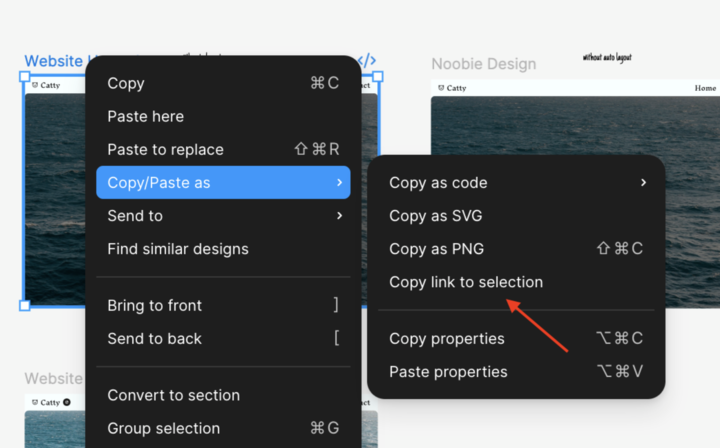 2. **Provide the Link**: Share the Figma frame link with Manus and describe what you want to build.
For example:
> "Here is the Figma design for our new mobile app. Build a functional web application based on this design."
3. **Manus Builds the App**: Manus will interpret the design and generate the HTML, CSS, and JavaScript for the frontend, as well as the necessary backend components to bring your design to life.
You can attach multiple frames to your request. Tell Manus how these frames relate—page flow, interactions, or component states (like hover). This helps Manus generate accurate multi-page or interactive experiences.
This integration dramatically accelerates the development process, bridging the gap between design and development and allowing you to go from a static design to a live, interactive application in a fraction of the time.
2. **Provide the Link**: Share the Figma frame link with Manus and describe what you want to build.
For example:
> "Here is the Figma design for our new mobile app. Build a functional web application based on this design."
3. **Manus Builds the App**: Manus will interpret the design and generate the HTML, CSS, and JavaScript for the frontend, as well as the necessary backend components to bring your design to life.
You can attach multiple frames to your request. Tell Manus how these frames relate—page flow, interactions, or component states (like hover). This helps Manus generate accurate multi-page or interactive experiences.
This integration dramatically accelerates the development process, bridging the gap between design and development and allowing you to go from a static design to a live, interactive application in a fraction of the time.