> ## Documentation Index
> Fetch the complete documentation index at: https://manus.im/docs/llms.txt
> Use this file to discover all available pages before exploring further.
> Turn raw data into presentation-ready insights in minutes
# Data Analysis & Visualization
## What is Data Analysis & Visualization?
Manus transforms raw data files into polished visual insights without requiring spreadsheet expertise or manual chart creation. Upload your data, describe what you want to learn, and Manus handles the analysis, creates professional visualizations, and delivers results in your preferred format, slides, reports, dashboards, or webpages.
Manus performs actual analysis, identifies patterns, extracts insights, and presents findings in a format ready for client meetings, executive presentations, or strategic decision-making.
## Quick Start
1. On the [manus.im](http://manus.im) main page, click on More > Visualization
2. **Upload Data**: Provide your data file (CSV, Excel, or other formats). This could be sales data, customer surveys, market research, financial records, or any structured dataset.
3. **Describe Your Analysis**: Use natural language to explain what you want to understand. Examples: "Identify growth opportunities and key metrics," "Compare performance across regions," "Find patterns in customer behavior."
4. **Choose Output Format**: Select how you want results delivered—slide deck, interactive dashboard, detailed report, or standalone webpage. Manus generates professional, presentation-ready output with charts, insights, and key findings.
### Market Trend Analysis
**Request**: "Analyze this sales data and identify seasonal patterns, top-performing products, and growth opportunities"
**Data**: 12 months of product sales across multiple categories
**Output**: Slide deck with line charts showing seasonal trends, bar charts comparing product performance, and strategic recommendations based on patterns identified
***
### Customer Segmentation
**Request**: "Segment these customers by behavior and create profiles for each group"
**Data**: Customer purchase history, demographics, engagement metrics
**Output**: Interactive dashboard with scatter plots showing customer clusters, pie charts for segment distribution, and detailed profiles for each customer type
***
### Competitive Benchmarking
**Request**: "Compare our metrics against competitors and highlight where we lead or lag"
**Data**: Performance metrics from 10 companies in the industry
**Output**: Report with radar charts showing multi-dimensional comparison, bar charts for individual metrics, and strategic insights about competitive positioning
## Visualization Options
Manus supports a comprehensive range of chart types, allowing you to select up to five different visualization styles for a single analysis. This ensures your data is presented in the most effective format for your audience.
| Chart Type | Best For |
| :---------------- | :--------------------------------------------------------- |
| **Bar Charts** | Comparing values across categories, showing rankings |
| **Line Charts** | Displaying trends over time, showing growth patterns |
| **Pie Charts** | Illustrating proportions and percentage breakdowns |
| **Scatter Plots** | Revealing correlations and relationships between variables |
| **Heat Maps** | Showing intensity patterns across two dimensions |
| **Radar Charts** | Multi-dimensional comparisons, competitive analysis |
**Mix and Match**: Select multiple chart types for comprehensive analysis. For example, combine line charts (trends), bar charts (comparisons), and pie charts (composition) in a single output.
## Output Formats
### Slide Decks
**What You Get**: Complete presentation with title slide, executive summary, individual charts with insights, and conclusions.
**Best For**: Client presentations, executive briefings, team meetings, investor updates.
**Features**: Professional design, speaker notes, export to PowerPoint, ready to present.
***
### Interactive Dashboards
**What You Get**: Web-based dashboard with multiple visualizations, filters, and interactive elements.
**Best For**: Ongoing monitoring, team collaboration, self-service exploration.
**Features**: Real-time updates, clickable charts, responsive design, shareable link.
***
### Detailed Reports
**What You Get**: Comprehensive document with methodology, findings, visualizations, and recommendations.
**Best For**: Strategic planning, documentation, detailed analysis, audit trails.
**Features**: Professional formatting, citations, export to PDF, full context.
***
### Standalone Webpages
**What You Get**: Public or private webpage with visualizations and narrative.
**Best For**: Sharing with external stakeholders, embedding in websites, public reporting.
**Features**: Custom branding, responsive design, no login required, permanent link.
## Real-World Use Cases
### Sales Performance Analysis
**Scenario**: Quarterly sales review for executive team
**Data**: Sales transactions, customer data, product performance
**Output**: Slide deck with regional comparison bar charts, product trend lines, customer segment pie charts, and strategic recommendations
**Result**: Executive-ready presentation delivered in minutes instead of hours of manual Excel work
### Customer Survey Insights
**Scenario**: Understanding customer satisfaction and pain points
**Data**: Survey responses from 500 customers
**Analysis**: "Analyze satisfaction scores, identify common complaints, and segment by customer type"
**Output**: Report with satisfaction trend lines, complaint category bar charts, customer segment profiles, and improvement recommendations
**Result**: Actionable insights with professional visualizations for product team
### Market Research Compilation
**Scenario**: Competitive landscape analysis for strategy meeting
**Data**: Competitor data from Wide Research (pricing, features, market position)
**Analysis**: "Create competitive positioning map and identify our differentiation opportunities"
**Output**: Interactive dashboard with scatter plot positioning map, feature comparison heat map, pricing analysis bar charts
**Result**: Strategic insights visualized for immediate decision-making
### Financial Trend Monitoring
**Scenario**: Monthly financial review for board meeting
**Data**: Revenue, expenses, cash flow over 24 months
**Analysis**: "Show revenue trends, expense breakdown, and cash flow projections"
**Output**: Slide deck with revenue line charts, expense pie charts, cash flow waterfall charts, and financial health summary
**Result**: Board-ready financial presentation with professional visualizations
## When to Use Data Analysis & Visualization
**Ideal For**:
* Preparing presentations from raw data
* Client meetings requiring visual insights
* Executive briefings and board reports
* Market research synthesis
* Performance reviews and KPI tracking
* Customer behavior analysis
* Competitive benchmarking
* Financial reporting
**Not Ideal For**:
* Real-time data streaming (use static datasets)
* Highly specialized statistical modeling (use dedicated tools)
* Data that requires extensive cleaning (clean first, then analyze)
* Exploratory data science (better suited for structured questions)
## Tips for Effective Data Analysis
**Be specific in your request**:
* ✅ "Identify seasonal patterns in sales and recommend inventory adjustments"
* ❌ "Analyze this data"
**Choose appropriate chart types**:
* Trends over time → Line charts
* Category comparisons → Bar charts
* Proportions → Pie charts
* Correlations → Scatter plots
* Multi-dimensional → Radar charts
**Select the right output format**:
* Presenting to executives → Slide deck
* Ongoing monitoring → Dashboard
* Documentation → Report
* External sharing → Webpage
**Provide context in your data**:
* Include column headers that are self-explanatory
* Remove unnecessary columns before upload
* Ensure dates are formatted consistently
* Clean obvious errors first
**Combine with other Manus features**:
* Use Wide Research to gather competitive data, then visualize it
* Create analysis in Data Viz, then embed in Web Development project
* Generate charts, then include in Slides for comprehensive presentation
## Common Questions
PDF,CSV, Excel (XLSX, XLS), and other common structured data formats. The data should be organized in rows and columns with clear headers for best resultes
Yes. You can upload multiple files and request analysis that combines or compares them.
You can select up to 5 different chart types for a single analysis, ensuring comprehensive visualization of your data.
Yes. You can request modifications: "Make the bars wider," "Change colors to match our brand," "Add data labels to the pie chart."
Manus can handle basic data preparation, but for best results, ensure your data is reasonably clean before upload. Remove obvious errors and ensure consistent formatting.
Yes. Depending on output format, you can export to PowerPoint (slides), PDF (reports), or access standalone webpages with permanent links.
Manus focuses on insight generation and presentation-ready output, not manual data manipulation. It's faster for creating polished visualizations but not a replacement for detailed spreadsheet work.
The current version works with static datasets. For ongoing monitoring, you can re-run analysis with updated data files.
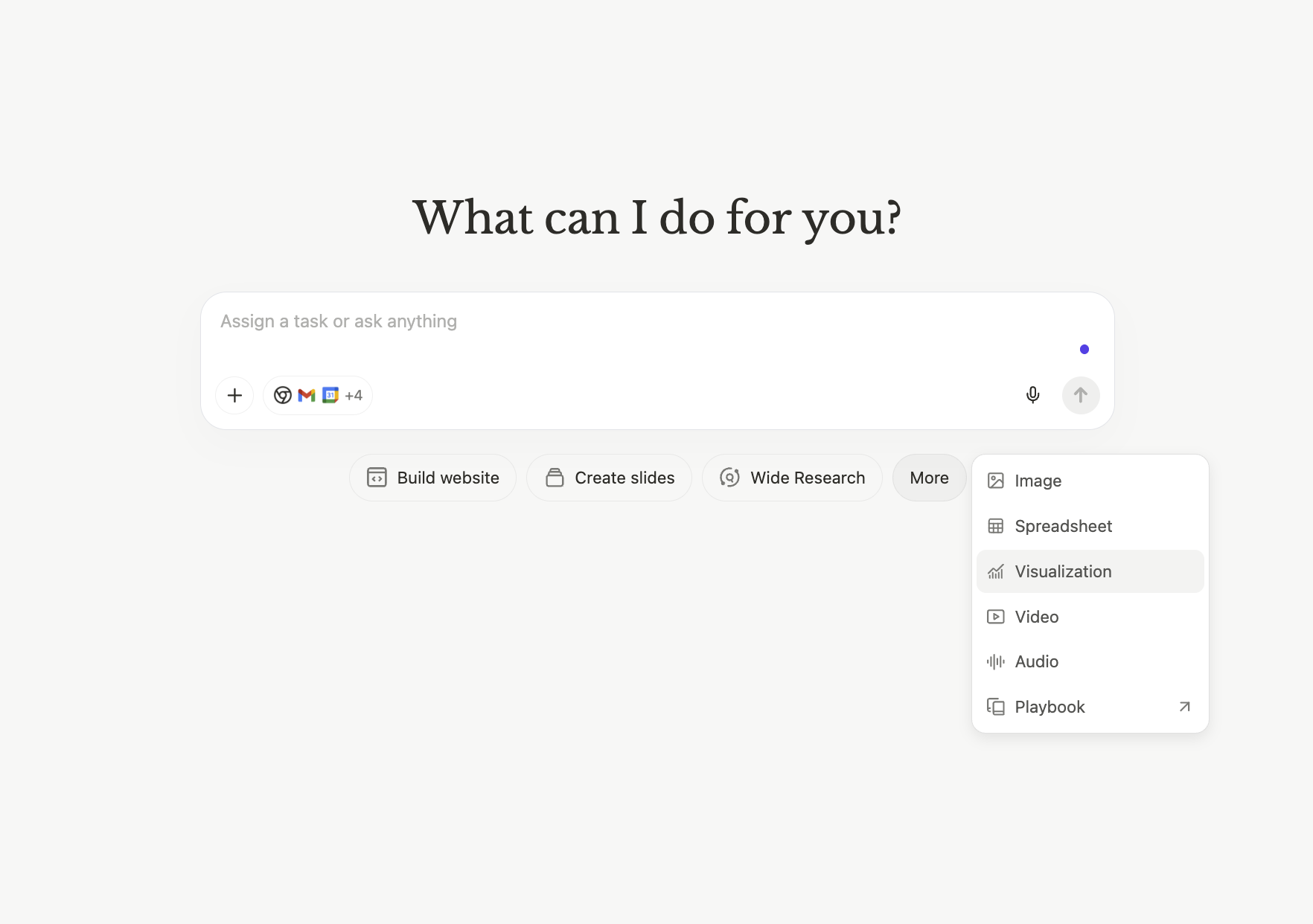 1. On the [manus.im](http://manus.im) main page, click on More > Visualization
2. **Upload Data**: Provide your data file (CSV, Excel, or other formats). This could be sales data, customer surveys, market research, financial records, or any structured dataset.
3. **Describe Your Analysis**: Use natural language to explain what you want to understand. Examples: "Identify growth opportunities and key metrics," "Compare performance across regions," "Find patterns in customer behavior."
4. **Choose Output Format**: Select how you want results delivered—slide deck, interactive dashboard, detailed report, or standalone webpage. Manus generates professional, presentation-ready output with charts, insights, and key findings.
### Market Trend Analysis
1. On the [manus.im](http://manus.im) main page, click on More > Visualization
2. **Upload Data**: Provide your data file (CSV, Excel, or other formats). This could be sales data, customer surveys, market research, financial records, or any structured dataset.
3. **Describe Your Analysis**: Use natural language to explain what you want to understand. Examples: "Identify growth opportunities and key metrics," "Compare performance across regions," "Find patterns in customer behavior."
4. **Choose Output Format**: Select how you want results delivered—slide deck, interactive dashboard, detailed report, or standalone webpage. Manus generates professional, presentation-ready output with charts, insights, and key findings.
### Market Trend Analysis
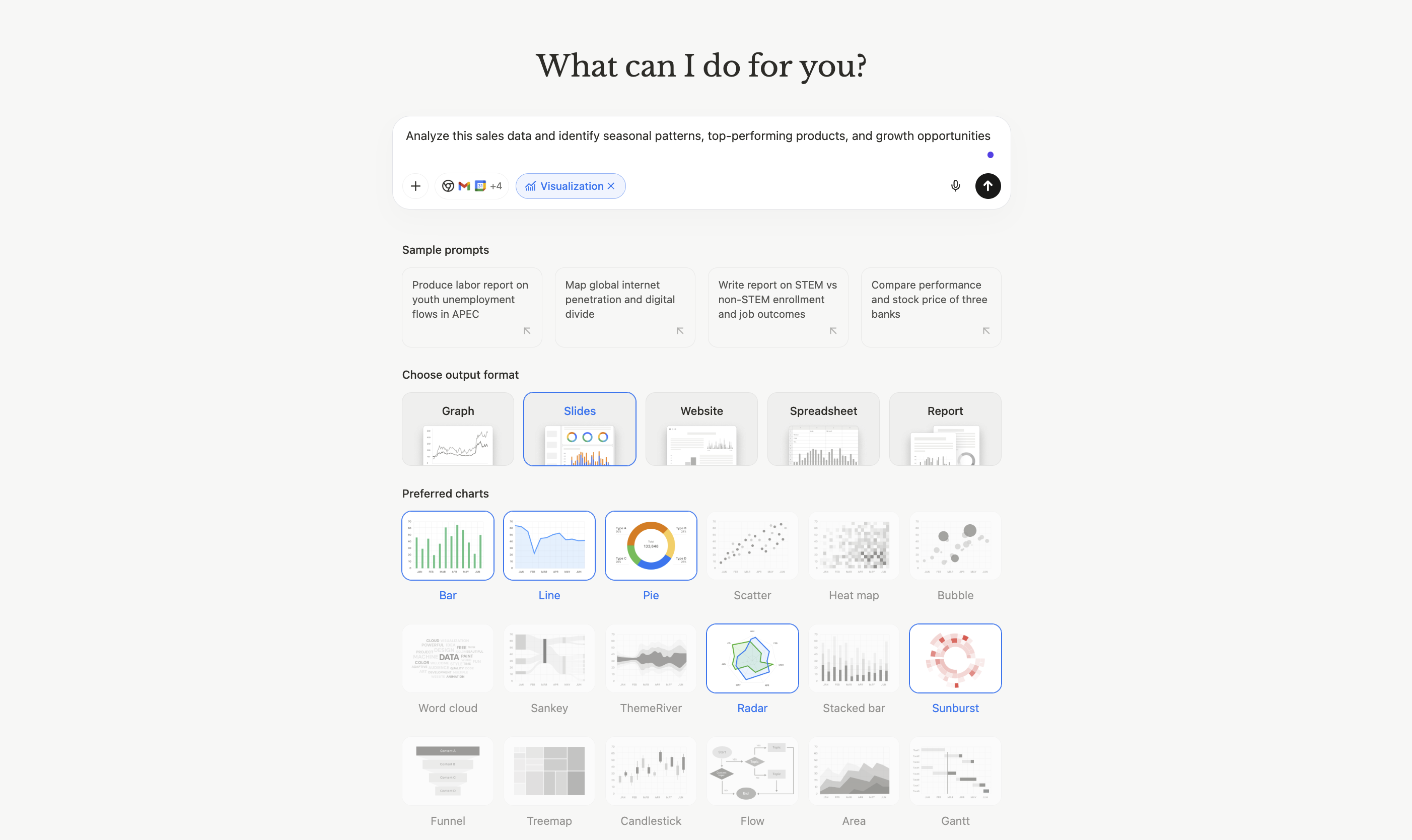 **Request**: "Analyze this sales data and identify seasonal patterns, top-performing products, and growth opportunities"
**Data**: 12 months of product sales across multiple categories
**Output**: Slide deck with line charts showing seasonal trends, bar charts comparing product performance, and strategic recommendations based on patterns identified
***
### Customer Segmentation
**Request**: "Segment these customers by behavior and create profiles for each group"
**Data**: Customer purchase history, demographics, engagement metrics
**Output**: Interactive dashboard with scatter plots showing customer clusters, pie charts for segment distribution, and detailed profiles for each customer type
***
### Competitive Benchmarking
**Request**: "Compare our metrics against competitors and highlight where we lead or lag"
**Data**: Performance metrics from 10 companies in the industry
**Output**: Report with radar charts showing multi-dimensional comparison, bar charts for individual metrics, and strategic insights about competitive positioning
## Visualization Options
Manus supports a comprehensive range of chart types, allowing you to select up to five different visualization styles for a single analysis. This ensures your data is presented in the most effective format for your audience.
| Chart Type | Best For |
| :---------------- | :--------------------------------------------------------- |
| **Bar Charts** | Comparing values across categories, showing rankings |
| **Line Charts** | Displaying trends over time, showing growth patterns |
| **Pie Charts** | Illustrating proportions and percentage breakdowns |
| **Scatter Plots** | Revealing correlations and relationships between variables |
| **Heat Maps** | Showing intensity patterns across two dimensions |
| **Radar Charts** | Multi-dimensional comparisons, competitive analysis |
**Mix and Match**: Select multiple chart types for comprehensive analysis. For example, combine line charts (trends), bar charts (comparisons), and pie charts (composition) in a single output.
## Output Formats
### Slide Decks
**What You Get**: Complete presentation with title slide, executive summary, individual charts with insights, and conclusions.
**Best For**: Client presentations, executive briefings, team meetings, investor updates.
**Features**: Professional design, speaker notes, export to PowerPoint, ready to present.
***
### Interactive Dashboards
**What You Get**: Web-based dashboard with multiple visualizations, filters, and interactive elements.
**Best For**: Ongoing monitoring, team collaboration, self-service exploration.
**Features**: Real-time updates, clickable charts, responsive design, shareable link.
***
### Detailed Reports
**What You Get**: Comprehensive document with methodology, findings, visualizations, and recommendations.
**Best For**: Strategic planning, documentation, detailed analysis, audit trails.
**Features**: Professional formatting, citations, export to PDF, full context.
***
### Standalone Webpages
**What You Get**: Public or private webpage with visualizations and narrative.
**Best For**: Sharing with external stakeholders, embedding in websites, public reporting.
**Features**: Custom branding, responsive design, no login required, permanent link.
## Real-World Use Cases
### Sales Performance Analysis
**Request**: "Analyze this sales data and identify seasonal patterns, top-performing products, and growth opportunities"
**Data**: 12 months of product sales across multiple categories
**Output**: Slide deck with line charts showing seasonal trends, bar charts comparing product performance, and strategic recommendations based on patterns identified
***
### Customer Segmentation
**Request**: "Segment these customers by behavior and create profiles for each group"
**Data**: Customer purchase history, demographics, engagement metrics
**Output**: Interactive dashboard with scatter plots showing customer clusters, pie charts for segment distribution, and detailed profiles for each customer type
***
### Competitive Benchmarking
**Request**: "Compare our metrics against competitors and highlight where we lead or lag"
**Data**: Performance metrics from 10 companies in the industry
**Output**: Report with radar charts showing multi-dimensional comparison, bar charts for individual metrics, and strategic insights about competitive positioning
## Visualization Options
Manus supports a comprehensive range of chart types, allowing you to select up to five different visualization styles for a single analysis. This ensures your data is presented in the most effective format for your audience.
| Chart Type | Best For |
| :---------------- | :--------------------------------------------------------- |
| **Bar Charts** | Comparing values across categories, showing rankings |
| **Line Charts** | Displaying trends over time, showing growth patterns |
| **Pie Charts** | Illustrating proportions and percentage breakdowns |
| **Scatter Plots** | Revealing correlations and relationships between variables |
| **Heat Maps** | Showing intensity patterns across two dimensions |
| **Radar Charts** | Multi-dimensional comparisons, competitive analysis |
**Mix and Match**: Select multiple chart types for comprehensive analysis. For example, combine line charts (trends), bar charts (comparisons), and pie charts (composition) in a single output.
## Output Formats
### Slide Decks
**What You Get**: Complete presentation with title slide, executive summary, individual charts with insights, and conclusions.
**Best For**: Client presentations, executive briefings, team meetings, investor updates.
**Features**: Professional design, speaker notes, export to PowerPoint, ready to present.
***
### Interactive Dashboards
**What You Get**: Web-based dashboard with multiple visualizations, filters, and interactive elements.
**Best For**: Ongoing monitoring, team collaboration, self-service exploration.
**Features**: Real-time updates, clickable charts, responsive design, shareable link.
***
### Detailed Reports
**What You Get**: Comprehensive document with methodology, findings, visualizations, and recommendations.
**Best For**: Strategic planning, documentation, detailed analysis, audit trails.
**Features**: Professional formatting, citations, export to PDF, full context.
***
### Standalone Webpages
**What You Get**: Public or private webpage with visualizations and narrative.
**Best For**: Sharing with external stakeholders, embedding in websites, public reporting.
**Features**: Custom branding, responsive design, no login required, permanent link.
## Real-World Use Cases
### Sales Performance Analysis